How Zero-Ops AI App Builders Divide Team Responsibilities
See how zero-ops AI app builders shift routine infrastructure work to the platform while developers shape applications and operations teams oversee security, reliability, releases, and production risk.
Jens Dressler
By Turbofy®

A zero-ops app builder lets developers spend 100% of their time building and improving product functionality while the platform handles much of the operational work. That’s different from DevOps, which brings development and operations together around shared responsibility, and NoOps, which abstracts infrastructure management. ZeroOps shifts more routine operations into the platform, but it doesn’t eliminate production oversight.
That distinction matters: speed helps only when releases stay controlled, reliable, and secure. Developers still shape the application and its behavior; operations teams still set safeguards, manage risk, and respond when systems need attention.
This article compares ZeroOps with DevOps and NoOps, then shows what developers and operations teams handle in practice. It covers production approvals, reliability, security, and managed services, so you can judge where operational work can be reduced and where human oversight still matters.
Key Takeaways
-
Separate what platforms can automate from the product decisions and operational accountability that still belong to people.
-
Compare DevOps, NoOps, and ZeroOps by how each model shares or abstracts infrastructure work, not by assuming one removes every responsibility.
-
Assess how development and production environments, release controls, and security practices fit together before relying on automation.
-
Understand how usage-based charges can affect total costs, and which workload factors to examine when comparing platforms.
-
Explore how Turbofy’s development workspace, managed hosting, and AI integrations can support building business applications in one workspace.
Table of Contents
What does ZeroOps mean for developers and operations teams?
ZeroOps shifts routine infrastructure work to a platform while people retain responsibility for application decisions. Unlike low-code tools, a zero-ops app builder focuses on building, running and managing applications. Traditional cloud hosting provides infrastructure but leaves more configuration and operations to the team.
Infrastructure and App Lifecycle
ZeroOps brings development and production infrastructure together with tools that support an application’s lifecycle. Teams can move from a code change to a deployed feature without separately managing every underlying resource.
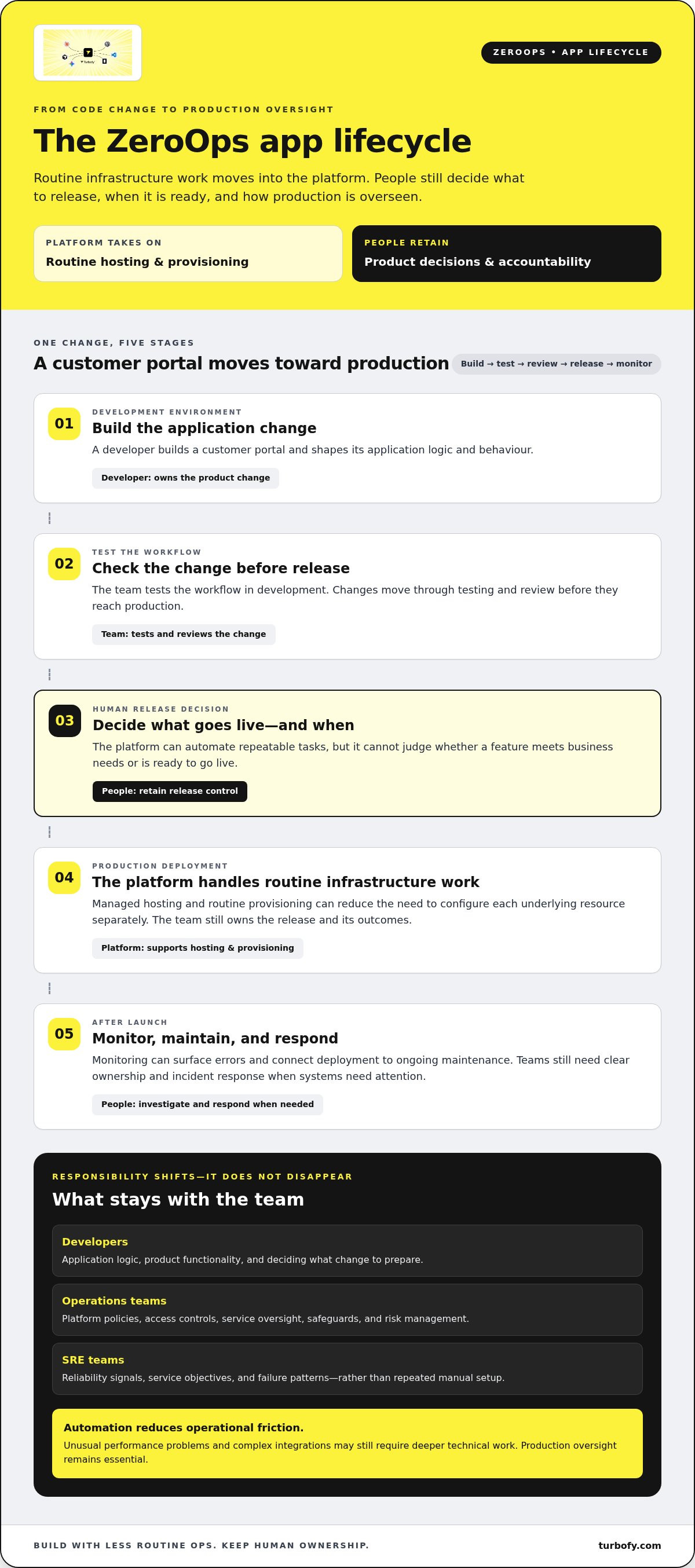
For example, a developer builds a customer portal in a development environment, tests a workflow, and then prepares the production launch. The platform may handle hosting and routine provisioning, while the team decides what to release and when. Monitoring can surface errors after launch, linking deployment to ongoing maintenance instead of treating production as a handoff.
This developer-first approach integrates infrastructure tasks into the software development lifecycle. A change begins with application logic, moves through testing and review, then reaches production through the team’s release process. Automation can handle repeatable tasks, but it cannot decide whether a feature meets business needs or is ready to go live.
Impacts on Technical Teams
ZeroOps changes how developers, operations teams, and site reliability engineering (SRE) teams spend their time. Developers can focus more on product functionality, while operations teams shift from routine provisioning to platform policies, access controls, and service oversight.
The model described here recommends developers dedicate 100 % of their time to building and improving product functionality. That’s a direction, not a claim that operational work vanishes. Data teams spend most of their time responding to operational problems, and a data bug can remain undetected in a production table for weeks, affecting downstream consumers. Monitoring, clear ownership, and incident response still matter.
SRE teams can focus on reliability signals, service objectives, and failure patterns instead of repeating manual setup. For example, they might review alerts from a deployed application and help trace a fault across services. Developers still fix application logic, and operations teams still shape safe platform use. The division of work changes, but accountability remains shared.
Risks, Limitations, and Vendor Lock-In
ZeroOps platforms reduce infrastructure work through managed capabilities, but can create dependencies on a platform’s tools and workflows. This matters if an application needs a different hosting model or the team later wants to change its deployment process.
Vendor lock-in can arise when application logic depends on platform-specific services, data formats or deployment controls. Before committing, map which parts are portable: source code, data, authentication choices, integrations and release configuration. For example, check whether a customer portal can keep its core business logic separate from platform-specific automation.
There are limits to abstraction. A platform can automate routine infrastructure tasks, but unusual performance problems or complex integrations may require deeper technical work. Teams should retain monitoring, ownership of production changes and a way to investigate failures. ZeroOps reduces operational friction; it does not remove the need to understand how an application behaves.
Differences between DevOps, NoOps and ZeroOps
These models differ in who handles infrastructure, deployment and production operations. DevOps shares responsibility, NoOps aims to abstract operations, and ZeroOps moves repeatable work into an app platform while retaining human oversight.
DevOps connects development and operations through shared practices. Developers write and test code, while operations specialists help manage deployment, infrastructure and reliability. A team using Kubernetes, for example, may automate builds but still maintain cluster configuration and release pipelines. Collaboration improves, but infrastructure work remains part of the team’s workload.
NoOps describes an ambition to make infrastructure management largely invisible to application teams. A managed service might handle provisioning and scaling behind the scenes, leaving developers to focus on application logic. Operations do not disappear: platform teams and service providers still maintain the systems, while the application team relies on their controls and capabilities.
ZeroOps applies similar abstraction to building and running applications through a more integrated platform. A zero-ops app builder can combine coding, deployment and operational capabilities in one workflow. For example, a developer creates an internal approval app, connects its data, tests a change and prepares a production release without configuring each infrastructure layer separately.
The practical difference is the boundary of responsibility. DevOps emphasizes collaboration across roles; NoOps emphasizes hiding infrastructure complexity; ZeroOps emphasizes reducing routine operational steps within the app-building experience. None removes ownership of the application or its outcomes.
Compare the models through a concrete change, such as adding customer search to a business app. With DevOps, developers and operations coordinate the code, deployment pipeline and infrastructure. With NoOps, managed services abstract more infrastructure tasks. In a ZeroOps workflow, the platform may connect building, testing and deployment, while people decide whether the feature is ready.
Metrics can show whether the shift is helping. Teams can track deployment success, production errors, recovery work and time spent on infrastructure tasks. These measures reveal where automation removes repetitive steps and where manual work remains. Intelligent automation can handle defined patterns, but unusual failures still require investigation and accountable decisions.
Choose by workload, not label. A team with specialised infrastructure requirements may value DevOps controls; a standard business app may benefit from a more managed workflow. To explore how an AI-assisted app development workspace fits this model, compare its building and deployment flow with your team’s current process.
High availability, security and compliance
Automated hosting can remove routine infrastructure work, but it does not resolve production risk. For a business app used by customers in Germany, teams still need to understand availability, access, data handling and the evidence behind each control.
Availability Is an Architecture Choice
High availability means designing an application to keep working when a component fails. A managed platform may handle some infrastructure tasks, but teams need to understand its recovery and monitoring arrangements.
Start with the user journey. If a sales team relies on an order dashboard, identify which functions must remain accessible during a database or network problem. Then examine how the platform handles backups, recovery, traffic distribution and service interruptions. These capabilities affect resilience, but they do not make every application equally available.
Check monitoring from the application’s perspective. A server can respond even while a key workflow fails, such as saving a customer record. Track user-facing signals, error logs and dependencies so alerts point to actionable problems. Define who reviews alerts and how teams communicate during an incident. Without clear ownership, monitoring can generate signals nobody acts on.
Security Controls Need Clear Boundaries
Security spans both platform controls and application choices. A platform may manage infrastructure protections, while developers configure authentication, permissions and the data each user can access.
For example, an internal finance app should distinguish viewers from approvers. Test those roles with separate accounts before production, and confirm that each screen and data request enforces the intended permissions. Review service credentials, secrets and integrations as part of the release process. Convenience should not turn a broad access token into a permanent shortcut.
AI agents introduce another boundary. If an agent can read records or trigger workflows, define its permitted actions and available data. A sandbox can isolate experiments from live records, while human review can catch unexpected outputs before they affect customers. Treat agent access as an application permission, not an invisible background feature.
Compliance Requires Evidence
A useful way to approach compliance is to be prepared to explain how data and access are managed. A German business should map the data its app collects, where it flows and which roles can access it.
For a customer support tool, document the fields collected, connected services, retention decisions and access responsibilities. Keep change records showing who approved a release and what changed. This helps teams answer internal reviews with evidence rather than assumptions. A hosting platform can support this work, but engineering teams remain responsible for how their application uses data.
Before launch, trace a record from entry to deletion, review permissions, test a failure scenario and identify the incident owner. This concrete exercise can expose gaps in availability, security and compliance before production users depend on the app.
Human approval before production changes
Automation can prepare a release, but a person should decide whether a production change is ready. For a customer-facing booking app, that review could catch a broken payment flow before customers encounter it. ZeroOps changes how teams build and deploy, not who owns the consequences of a live release.
Set approval points according to risk. A copy adjustment may need a lightweight review, while a change to customer permissions or payment handling deserves closer scrutiny. The developer explains what changed, the reviewer checks its impact, and an authorised person approves or blocks deployment. This keeps routine work moving without treating every change alike.
A useful release review connects the proposed change to evidence. For example, a coding agent might update an order form and report that its tests pass. A human reviewer still checks the changed fields, confirms the tests cover the intended customer journey and considers whether the update affects existing records. Test results inform approval; they do not replace judgement.
-
Review the change: Compare the proposed update with the requested behaviour, such as adding a delivery option.
-
Check test evidence: Confirm that key flows, including order submission and confirmation, behave as expected.
-
Assess production impact: Identify affected users, data and connected services before approving deployment.
-
Record the decision: Capture the reviewer, change purpose and outcome in the release history.
Separate permissions make this control meaningful. The person or agent preparing a release should not automatically approve its production deployment. For a staff scheduling app, a developer can create a shift-rule change while a manager or designated reviewer checks its effect before it reaches the live schedule. The reviewer needs enough context to spot changes beyond the intended scope.
Approval also creates a clear response path when failures occur. If a new inventory rule blocks product updates, the release record helps the team identify what changed and who reviewed it. The team can then decide whether to disable the change, restore an earlier version or prepare a correction. A documented decision speeds investigation without assuming every release will work perfectly.
Keep the workflow proportionate. Too little review exposes production to avoidable mistakes; too much can slow low-risk improvements. Define which changes need human approval, who can approve them and what evidence each decision requires. For example, changes to authentication or customer data may need closer review than a visual adjustment. This lets automation speed up delivery while people retain control of consequential production changes.
How much do popular zero-ops app builders cost, including usage-based fees?
There is no single market price for these platforms. Costs depend on what each provider includes, how the app runs and which usage limits apply. Compare the complete workload, not just the headline subscription. A low entry tier can still lead to additional charges as data, users, automation or hosting needs grow.
Start by separating fixed charges from variable ones. A subscription may cover access to the builder or a defined set of capabilities. Usage-based fees can vary with compute, storage, database activity, network traffic or AI requests. A zero-ops app builder may use different billing units from another platform, so identify each meter before estimating the total.
Model a real app, such as an order-tracking portal. List expected users, records created, file storage, connected services and automated tasks. Then consider how those inputs may change as the portal gains users or handles busier periods. An estimate based only on a quiet launch can miss growth costs or background processes that keep running.
Look closely at thresholds and overages. A plan might include a usage allowance, charge for activity beyond it or restrict features until an upgrade. Check how the platform counts development and production activity, whether test runs use the same resources, and what happens when usage reaches a limit. These details matter when teams test frequently or run several environments.
-
Builder access: Identify which editing, collaboration and deployment capabilities the subscription includes.
-
Runtime usage: Check how compute, storage, database operations and traffic affect billing.
-
Automation: Examine whether workflow runs, integrations or AI requests use separate allowances.
-
Scaling: Understand how higher usage changes the plan or triggers additional charges.
-
Exit costs: Consider migration effort if data or workflows depend on platform-specific features.
For teams in Germany, compare offers in euros and use the same workload assumptions for each platform. A specific platform quote depends on the case and is provided after a quote request; cost factors include selected capabilities, resource consumption, connected services and expected usage.
Track actual consumption after launch. Compare invoices with app activity, identify which features drive usage and adjust workflows that generate unnecessary requests. A reporting dashboard can connect a usage spike to a release or automation, making cost reviews more practical than relying on a broad estimate alone.
Build a cost model before committing: define the app workload, map each billable unit, then test lower and higher usage scenarios. Compare zero-ops app builders by the same workload, and explore how an managed app-building workflow fits your requirements.
Turbofy: Turbofy App Development Workspace
Turbofy brings AI-driven app building into the Turbofy App Development Workspace, where teams create business applications through a chat conversation. The workspace combines data handling, authentication, hosting and workflow automation, helping developers move from an app idea to a working build.
Turbofy provides Managed App Hosting to host applications alongside development, and AI Agent Integrations to connect coding assistants such as Claude, ChatGPT, GitHub Copilot or Gemini. The Free Tier lets you explore the workspace while shaping an app and its workflows.
If this approach fits your team’s needs, visit turbofy.com to explore Turbofy or get in touch.
Turn the model into your next build
Choose a business process that creates friction today, then define what a useful first version needs to do. Map its users, data and approval points before building. This gives your team a focused way to assess whether a zero-ops app builder reduces operational effort without weakening production oversight.
Start with a small, real workflow rather than a broad platform redesign. A team might begin with an internal request app, then refine its permissions and release process as it learns from use. Clear ownership and a defined production approval path keep speed tied to accountability.
Turbofy brings app creation into its Turbofy App Development Workspace, alongside Managed App Hosting and AI Agent Integrations. Put these capabilities to work when you’re ready to shape a business application in one workspace.
Contact Turbofy about your app and take the next step from idea to build. Your team can move forward with a clear use case and a practical foundation.
Frequently Asked Questions
How does ZeroOps differ from DevOps and NoOps?
ZeroOps packages more application and operational tasks into a managed workflow, while DevOps coordinates development and operations, and NoOps aims to abstract infrastructure management. For example, a team building an internal booking tool might use DevOps practices to manage its release pipeline or choose a platform that handles more routine deployment steps. In every model, people remain responsible for application decisions and how changes affect users.
What are the main business benefits of adopting ZeroOps?
ZeroOps can help a business reduce routine infrastructure work and move application ideas into testing sooner. This can help when a team needs an internal request tracker but lacks capacity to manage every hosting layer. The practical benefit depends on whether the platform’s workflow fits the app. Measure time spent on repeatable setup, release effort and follow-up fixes, alongside user feedback, to assess its value.
What kind of platform supports ZeroOps app development?
A zero-ops app builder brings app creation together with managed operational capabilities. A product team might describe an internal inventory app, refine its fields and workflows, then prepare it for use without assembling every infrastructure component separately. The platform supports the build process; the team still defines business rules, checks outputs and decides whether the application suits its users.
How do these platforms handle hosting, scaling, backups, and security?
Builders provide these capabilities through platform features and settings, which vary by provider. For a booking app, hosting runs the application, scaling responds to changes in demand, backups help preserve recoverable data, and security controls manage access. Review each capability separately: identify what runs automatically, what your team configures and how to restore a test record. Do not assume one platform feature covers every application requirement.
How do you build and deploy an app with a zero-ops app builder?
Start by describing one user task, such as submitting an equipment request. Define the fields, roles and approval path, then build a small version and test it with realistic sample records. Fix confusing steps before inviting users. Next, review permissions and integrations, then deploy through the platform’s release workflow. After launch, monitor usage and user reports, and refine the app in response to observed problems.
How should German businesses assess GDPR and EU data residency?
Assess the platform’s data handling against your application’s needs rather than relying on a general compliance label. Evaluate where application data, backups and logs are stored, along with information about processing, subprocessors, access and deletion. Map the app’s data flows, including connected services, before selecting a platform. This gives your team a clearer basis for evaluating data protection and residency requirements.