

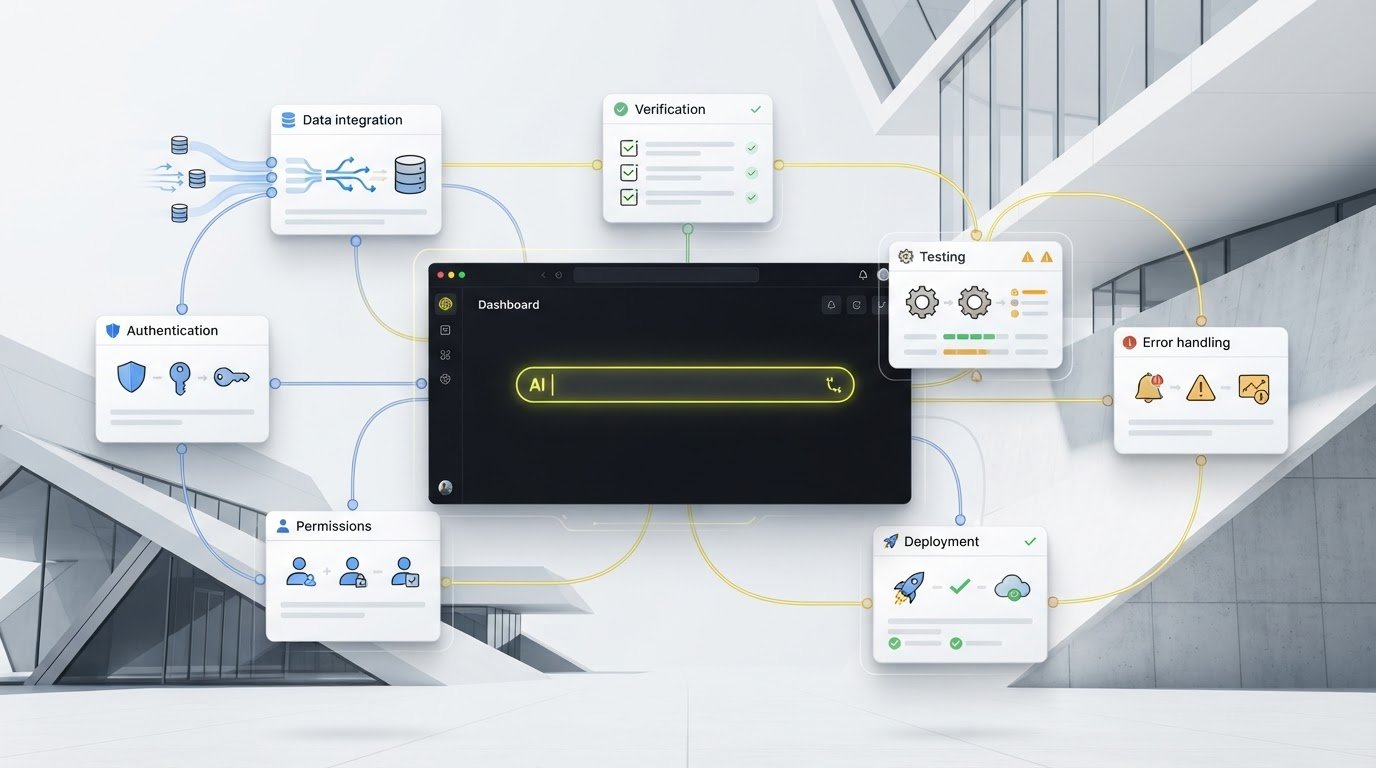
Replit Agent Alternative: Compare the Right Platform for Your App in 2026
Compare Replit Agent alternatives by app-building workflow, data, authentication, hosting, and ongoing maintenance. Learn how to shortlist and test the right platform for your team.
Jens Dressler
By Turbofy®

Replit Agent Alternative: Compare the Right Platform for Your App in 2026
The best Replit Agent alternative may not be the tool that generates code fastest. If you’re comparing platforms, the bigger question is what happens after the first impressive prototype.
Replit can make it feel simple to turn a prompt into an app. But a working demo doesn’t answer practical questions: where does the data live, how does authentication work, and what will it take to host and maintain the app? The right choice depends on what you’re building and how your team wants to work.
This guide compares Replit alternatives by workflow and the responsibilities they handle, from coding-first assistants for developers to app-building workspaces for business teams. You’ll learn how to match a platform to your project, build a realistic shortlist, and test each option against the same use case.
We’ll also look at Turbofy, a cloud-based workspace that brings app building, data handling, authentication, managed hosting, and workflow automation together, with integrations for Claude, ChatGPT, GitHub Copilot, and Gemini. The goal is to choose for the work beyond the first prompt, not just the speed of the demo.
Key Takeaways
-
Compare platforms across app creation, data, authentication, hosting, workflows, and ongoing iteration, not just the speed of the first build.
-
Choose a Replit Agent alternative based on your project and team workflow, whether you’re building a business app, working in an existing codebase, or coding in a browser-based environment.
-
Run the same realistic app-building exercise in each shortlisted tool to compare setup, app behaviour, data flow, access, and deployment steps.
-
Distinguish coding assistants from integrated workspaces so you can see which operational responsibilities your team will still need to handle.
-
Consider Turbofy if your team wants chat-based business app building alongside data handling, authentication, managed hosting, and workflow automation.
Table of Contents
-
Choosing a Replit Agent Alternative Starts With the App You Need to Ship
-
Compare Replit Agent Alternatives by What Happens After the First Build
-
Test a Replit Agent Alternative With a Realistic App-Building Exercise
-
Move From Replit Agent Comparison to a Turbofy Business App Workflow
Choosing a Replit Agent Alternative Starts With the App You Need to Ship
A quick first build can prove an idea is possible. It doesn’t decide how the app will be operated, who will maintain it, or how the team will adapt it as requirements grow. Start with those responsibilities rather than a leaderboard of AI tools.
A Replit Agent alternative is any tool or platform that supports a different way to build software. That could mean AI assistance inside an existing codebase, a browser-based environment for creating and running code, or an integrated workspace for building and operating business applications. These categories can overlap, but they don’t take the same work off your team’s plate.
Collaborative development environments bring tools and team workflows together in a shared setup. The overview of Collaborative Development Environments can help clarify that concept, but a shared coding environment isn’t automatically a complete app operations platform.
What are you trying to replace in your current workflow?
Name the bottleneck before comparing products. Is project setup slowing developers down? Do they need more control over code and tools? Is the hard part operating the app, or coordinating changes across a team? Also identify where work begins: with a prompt, an existing repository, or a business process that needs to become an app. An internal dashboard or client portal, for example, may need a different workflow from a new coding experiment.
Use these distinctions to frame your search:
-
Coding assistance: AI helps developers write, explain, or change code, often within a code editor or existing project.
-
Browser-based building: The team creates and runs code in a browser-accessible environment, which may provide a hosted starting point.
-
Business-app workspace: App creation is brought together with responsibilities such as data handling, authentication, hosting, and workflow automation.
For a business app, list what users need to do and what the app must remember, restrict, or trigger. For example, an approval tool needs to track a request’s status, show the right information to the right people, and respond when someone approves or rejects it. This makes it easier to see whether a coding assistant will speed up implementation while leaving app operations elsewhere, or whether a more integrated workspace suits the work.
When does it make sense to leave Replit Agent?
Compare alternatives when your current workflow creates friction that matters to the project. Your team may want deeper coding control, need to build around an existing repository, or prefer a platform that groups app responsibilities together. On the other hand, a hosted starting point may be more useful than extra control when the priority is exploring an idea quickly. Neither approach is right for every team.
Make the choice against four practical factors:
-
App requirements: What data, access rules, and workflows does the app need?
-
Team skills: Who can inspect and maintain generated code?
-
Ownership: Who will manage the app after its initial build?
-
Ongoing work: How will the team test, update, and deploy changes?
If your current setup handles these needs without avoidable work, there may be no reason to switch. If it doesn’t, define the gap precisely, then compare platforms built for that workflow. This keeps the search focused on a usable app and the work required to sustain it, rather than a fast first demo.
Compare Replit Agent Alternatives by What Happens After the First Build
Compare the full path from an initial idea to a running app. A coding assistant can speed up implementation without providing hosting or authentication. An integrated workspace may bring several app responsibilities together, but the tools and implementation differ from platform to platform. Assess each capability rather than assuming it’s included.
Compare coding-first tools with integrated app workspaces
Coding-first options suit teams that want to work directly with source code and control how a project is built. No-code tools rely mainly on visual configuration, low-code tools combine visual building with some code, and AI-assisted coding uses natural-language prompts to help create or change code. These approaches can overlap, but they call for different skills and levels of control.
Use this scorecard to compare categories, then verify how each platform handles the details:
| Responsibility | Coding assistant | Browser-based builder | Integrated business-app workspace |
|---|---|---|---|
| App creation | AI helps write or modify code; the developer directs the build. | Build and run code in a browser-accessible environment; tools vary. | App building is part of a broader workspace; methods vary. |
| Data handling | Often depends on project code or connected services. | Platform-specific; check how data is configured and managed. | May be built into the workspace. Turbofy combines data handling with app building. |
| Authentication | Implementation may be left to the project team or its chosen services. | Platform-specific; examine how user access is set up. | Can be one of the combined responsibilities. Turbofy includes authentication. |
| Hosting | May require a separate deployment workflow. | Hosting options vary by platform. | May be included in the workspace. Turbofy combines app building with managed hosting. |
| Workflows | Usually shaped through code and connected tools. | Automation features vary. | May connect app behaviour and workflows. Turbofy includes workflow automation. |
| Iteration | Developers control changes in code. | Depends on the platform’s build and deployment flow. | Designed to support continued changes, with specifics varying by platform. |
Assess the business app lifecycle, not just code generation
For each candidate, trace a change from request to release. Who updates a record structure, adjusts user access, tests a workflow, and deploys the change? A platform that generates code quickly may still leave these steps to your team. The answer affects both the technical fit and the skills needed to own the app after launch.
Include team skills and preferred control in the comparison. Developers may favour direct code access, while teams focused on business processes may value a workspace that groups app-building responsibilities. Neither preference is universally better. The platform-specific details matter.
Turbofy’s cloud-based workspace combines business app building through an AI-driven chat interface with data handling, authentication, managed hosting, and workflow automation. It supports continued iteration and deployment, with integrations for Claude, ChatGPT, GitHub Copilot, and Gemini. If that combination matches your workflow, explore how Turbofy brings business app building into one workspace.
Which Replit Agent Alternative Fits Your Project and Team?
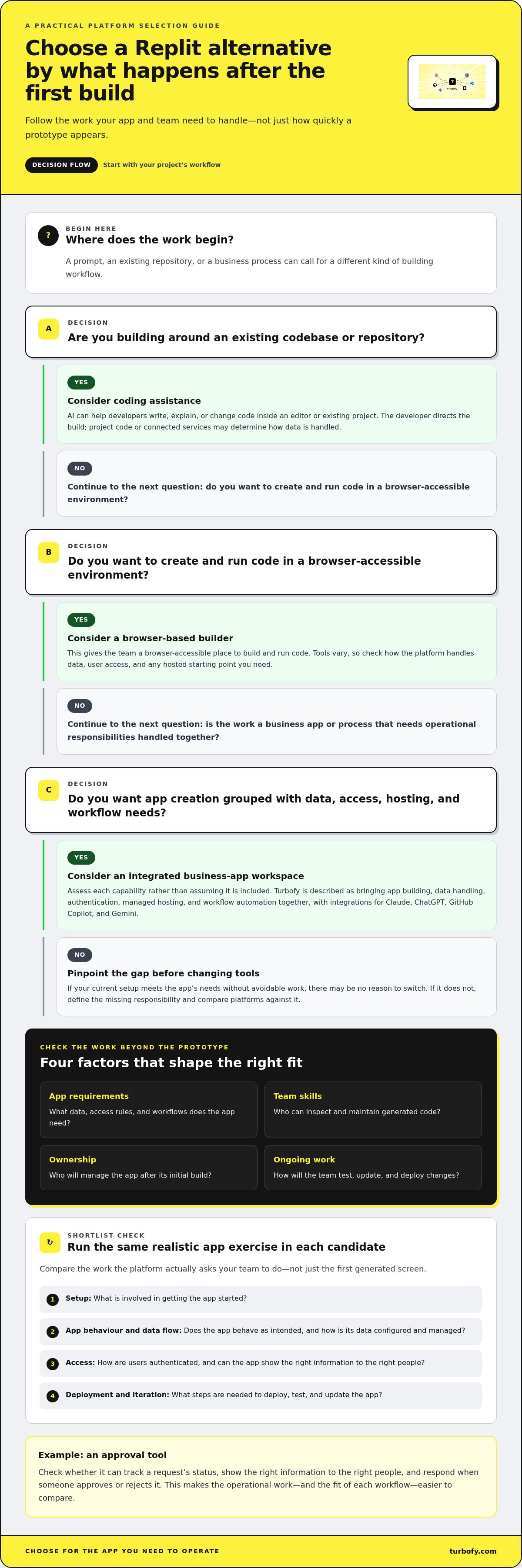
Use the project’s starting point to narrow the field. A new business process, an established repository, and a browser-based coding session call for different levels of control and different kinds of support. This decision matrix maps those needs to tool categories, rather than naming one universal winner.
Business apps and process-driven tools: Consider an integrated app-building workspace when the project involves data, user access, hosting, and workflow automation as well as the interface. Turbofy is one example: its cloud-based, chat-driven workspace combines these responsibilities. The trade-off is relying on a platform’s environment rather than assembling every part independently.
Existing codebases: Look at coding assistants that help developers work in a repository they already maintain. This approach preserves hands-on control over the code, but the team remains responsible for the app’s broader operations unless its existing stack already covers them.
Code-first development: Choose a workflow centred on direct code access when developers need to shape implementation and make detailed changes themselves. Tools such as Cursor and GitHub Copilot are examples in the coding-assistant category. This path suits teams comfortable owning the surrounding build and maintenance work.
Browser-based building: Consider this category when you want to create and run code through a browser-accessible environment. It can provide a convenient starting point, while the degree of coding control, operational support, and collaboration depends on the specific platform.
Before you shortlist, weigh four factors: control over code and technical choices, integration of app responsibilities, accessibility for the people who will build and use the tool, and platform dependence. An integrated workspace may reduce the number of separate systems a team coordinates, while a code-first approach can give developers more direct influence over implementation. Neither trade-off is automatically better.
Choose a coding-first alternative when code control leads
If your team already maintains a repository, direct code access matters. Developers can assess proposed changes in the context of the existing structure and keep implementation decisions close to the project. Cursor and GitHub Copilot are examples to compare in this category. The fit depends on whether your team wants AI support inside a code-led workflow and can own deployment and app operations around it.
Choose a business-app workspace when operations matter too
Internal tools, client portals, and process-driven apps need more than generated screens. Data handling, authentication, hosting, and workflow automation all shape how an app functions after the build. Turbofy brings these responsibilities together in a chat-based business-app workspace designed for continued iteration and deployment. It suits teams looking for that combined workflow, while teams with different requirements may prefer more direct control over separate components.
Make the decision against your real project, not the category label alone. A Replit Agent alternative is a stronger fit when its workflow matches your team’s skills, the control you need, and the responsibilities you’re prepared to own.
Test a Replit Agent Alternative With a Realistic App-Building Exercise
A polished demo can hide the work that comes after it. Run the same small, realistic build in every shortlisted platform, then test how the result behaves and how your team can change it. This gives you a fairer comparison than trying different prompts and relying on first impressions.
Build a small but representative business app
Choose a contained example, such as an internal request tracker with a simple approval flow. Before opening a tool, write down the user roles, essential fields, workflow steps, and what each person should see. Keep the scope narrow, but include enough detail to reveal how the platform handles app behaviour and operations.
-
Define the scenario. For the request tracker, specify a requester, an approver, request details, a status, and the expected path from submission to approval or rejection.
-
Use the same starting brief. Give each candidate identical requirements, including who can submit a request, who can review it, and what happens when its status changes.
-
Measure setup effort. Note what the team must configure before building, what the platform creates from the prompt, and where someone needs to make a decision or write code.
-
Exercise the app. Submit a request, review it as the approver, change its status, and confirm that the result matches the intended user experience. Try an incomplete request or an unauthorised action as well.
-
Trace the operational path. Follow how data is stored and accessed, how user authentication is handled, and what steps are required to deploy the app. Record any workflow automation involved.
-
Make a change. Add a field or adjust an approval rule. Track how the team understands the generated result, makes the revision, and checks that existing behaviour still works.
Use sample information during an initial evaluation. Don’t put sensitive production data into a test app. The goal is to examine the platform’s workflow, not expose real business records.
Score the result for iteration and operational fit
After each build, compare the same evidence: requirement coverage, behaviour under normal and incorrect inputs, clarity of data flow, access by role, deployment steps, and effort to revise the app. Note whether your team can understand what the platform produced, not just whether the result looks convincing.
Separate what worked from what remains unresolved. An app that passes a demo flow isn’t proof that every operational need is covered. Record gaps such as unclear access rules, deployment tasks the team must own, or a workflow that needs more implementation. Then weigh those gaps against the skills available to maintain the app.
For a comparison that includes a chat-driven business-app workspace, use the same exercise to evaluate Turbofy’s app-building workspace against your requirements for data handling, authentication, hosting, and workflow automation. The result should show whether that integrated approach fits your team, not declare a universal winner.
Move From Replit Agent Comparison to a Turbofy Business App Workflow
Choose your next platform by matching three things: the app’s requirements, your team’s skills, and the responsibilities you’ll own after the first version. If your priority is direct control over an existing codebase, a coding-first workflow may be the better fit. If you want to build and evolve a business app through chat while bringing key app responsibilities into one workspace, Turbofy offers that workflow.
Where Turbofy fits in the alternatives landscape
Turbofy is a cloud-based workspace for building business applications through an AI-driven chat interface. It brings app building together with data handling, authentication, managed hosting, and workflow automation, so teams can address these operational needs alongside the app itself. The platform supports continued iteration and deployment, not only an initial build.
It also integrates with Claude, ChatGPT, GitHub Copilot, and Gemini. Teams can use these AI assistants as part of their development process. The right fit still depends on the project: an established codebase or an application requiring a specific development workflow may call for different tools. No single platform is right for every app.
Start with a small business app and keep iterating
Pick a contained workflow your team understands, such as collecting internal requests and moving them through review. Define who uses it, what information it needs, and what should happen at each step. Then build a first version and evaluate it against those requirements, including how the data, access, hosting, and workflow fit together.
Keep the first scope focused, but don’t treat a successful initial build as the finish line. Ask the team to make a meaningful change, such as adding a request field or adjusting a process step. That reveals whether the app can evolve as the business process changes, and whether the people responsible can understand and continue working with the result.
This is the practical difference between choosing a tool for a prompt and choosing a workflow for an app. A Replit Agent alternative should match how your team builds, operates, and improves the product, not just how quickly it creates a first draft. Compare the requirements that matter, then try the workflow with a realistic business use case.
See how Turbofy can help you build and evolve a business app.
Turn Your Shortlist Into a Practical First Step
Before committing to a new workflow, name the person who’ll own the app after its first version and agree on what “ready to use” means for your team. Then choose one contained process, define a clear success condition, and use it to guide your next build. A focused trial can reveal whether a Replit Agent alternative supports how your team actually works, not just how it prefers to start.
Keep the evaluation grounded in real tasks. Can the people responsible make a change, understand its effect, and keep moving without losing sight of the business need? That’s a stronger signal than a polished first screen. Use what you learn to decide whether to refine your current approach or move forward with a workspace built around business apps.
Explore Turbofy and build your next business app. Start with one clear process and a team ready to shape it.
Frequently Asked Questions
What is the best Replit Agent alternative?
There isn't one best Replit Agent alternative for every team; the right choice depends on the app and how you'll maintain it. For an established codebase, compare coding assistants that fit developers’ current workflow. For a business application, decide whether you want to assemble data, access, and hosting separately or use a workspace that combines these responsibilities. Test a representative task before choosing.
Is Turbofy a Replit Agent alternative?
Yes. Turbofy is a Replit Agent alternative for teams building business applications through an AI-driven chat workspace. It combines data handling, authentication, hosting, and workflow automation, and integrates with Claude, ChatGPT, GitHub Copilot, and Gemini. It offers a different app-building workflow, rather than duplicating every Replit capability or suiting every software project.
Can I use a Replit Agent alternative with an existing codebase?
Yes, some alternatives support existing codebases, particularly coding assistants used alongside developers editing project code. Before adopting one, map your repository’s language, framework, dependencies, build process, and version-control practices. Test a small, isolated change and review it before merging. A browser-based builder or integrated workspace may use a different project model, so don’t assume it can take over an existing repository unchanged.
How do I compare Replit Agent alternatives for a business app?
Use an acceptance checklist based on the app’s real users. For a client portal, define who can view each type of record, which fields users can edit, how incomplete information should behave, and who owns release changes. Ask a teammate who didn’t build the app to complete a core task. That can expose usability and ownership issues a developer-only walkthrough may miss.
Will switching from Replit Agent require rebuilding my app?
Not always. If you only want a different AI assistant, you may be able to keep the app and change your development workflow. Moving the app itself is a separate question. Review its framework, data store, authentication, integrations, and deployment setup to see what can transfer. Keep backups and document dependencies first; migration effort depends on how well the new platform fits the existing architecture.
Can AI-generated apps be production-ready?
Yes, an AI-generated app can become production-ready, but generation alone doesn’t prove it’s safe or dependable for real users. Have someone qualified review the code or configuration, test expected and invalid inputs, verify access rules, and confirm deployment and backup procedures suited to the app. Before using real business records, assess how data is handled and decide who will own ongoing updates.