Turn Prompts into Business Software: Practical Examples for 2026
Learn how to turn business prompts into practical software by defining workflows, data, user roles, and permissions, then testing the app against real-world needs.
Turbofy Team
By Turbofy®

Turn Prompts into Business Software: Practical Examples for 2026
What if the spreadsheet your team updates every Friday could become a working app from a plain-language prompt? A prompt can start the build, but to turn prompts into business software, you need more than a clever description. Define the workflow, the data the app handles, and the rules that guide each step.
If your process lives in spreadsheets, messages, or repetitive manual tasks, translating it into technical requirements can feel like the hardest part. A convincing prototype also needs to work for real users, including the people, permissions, and exceptions involved in a live workflow.
This article shows how everyday business needs can become practical app workflows, from capturing a request to tracking its progress. You’ll learn what makes a prompt useful, how to assess and improve an app before relying on it, and how a chat-based workspace like Turbofy brings app-building, data handling, authentication, hosting, and workflows together. The goal is to move from a business idea to software your team can test and refine, without getting stuck at the first technical hurdle.
Key Takeaways
-
Spot app opportunities in repeated handoffs, scattered records, and manual status updates.
-
Turn prompts into business software by specifying who uses the app, what happens at each step, and what information it needs.
-
Compare approval, inventory, and onboarding workflows to see how prompt choices shape app behavior and trade-offs.
-
Test realistic roles, permissions, inputs, and edge cases before relying on an app in everyday work.
-
Explore how Turbofy brings app-building, data handling, authentication, hosting, and workflows into one chat-based workspace.
Table of Contents
-
Turn everyday business bottlenecks into software ideas worth prompting
-
What a prompt must specify to become a useful business application
-
Three business software examples: prompts, app behavior, and trade-offs
-
Move from first prompt to a dependable app through focused iterations
-
Build and evolve business software in Turbofy’s chat-based workspace
Turn everyday business bottlenecks into software ideas worth prompting
Start with the work, not the interface. Instead of asking for “an app to manage requests,” map the current process: someone submits a request, a colleague reviews it, a decision is made, and the requester needs to know what happens next. This turns a frustration into a workflow a prompt can describe.
Business software is workflows, data, users, and rules working together to produce a useful outcome. That’s what separates an app from a collection of screens. For a broader overview of its forms and history, see What is Business Software?
Look for recurring friction: a task handed between teams with no clear owner, information copied across spreadsheets and messages, or status updates someone has to chase. Each is a sign that a small app could make the process visible and consistent.
-
Request tracking: Capture submissions in one place, assign an owner, and show whether each item is new, in progress, or resolved.
-
Approvals: Route a purchase or leave request to the right reviewer, record the decision, and make the next step clear.
-
Inventory visibility: Log stock changes and flag items that need attention instead of relying on scattered updates.
Not every bottleneck is ready for a prompt. A focused internal tool with a few user roles, predictable steps, and known data is a strong starting point. A process with frequent exceptions, unclear decision rights, or consequences spanning several departments needs more discovery first. Clarify who owns each decision and which cases fall outside the usual path before asking an app to handle them.
Which business tasks are strong candidates for prompt-built apps?
Choose a recurring, rules-based process with identifiable users and clear inputs. For example, a team may need to record a request type, description, urgency, and assigned owner, then move the request through defined statuses. If people can explain the usual steps and what “done” means, they can describe a useful first version without translating every need into technical language.
From vague frustration to a specific app outcome
Take the complaint “we lose track of requests.” Turn it into a practical outcome: every request is captured, assigned, reviewed, and closed, with its status visible to the people involved.
Hypothetical prompt: “Build an internal request-tracking app for employees and operations staff. Employees submit a request with a category, description, and urgency. Operations staff review new requests, assign an owner, and update the status to in progress or resolved. Keep the requester, submission date, owner, status, and decision notes with each record. Employees can view their own requests; operations staff can manage all requests. Make unresolved requests easy to identify.”
This prompt names the users, decisions, records, and outcome. Before building, clarify exceptions such as duplicate submissions or requests that need more information. Specific inputs and rules help you turn prompts into business software that reflects the real process, not just the original frustration.
What a prompt must specify to become a useful business application
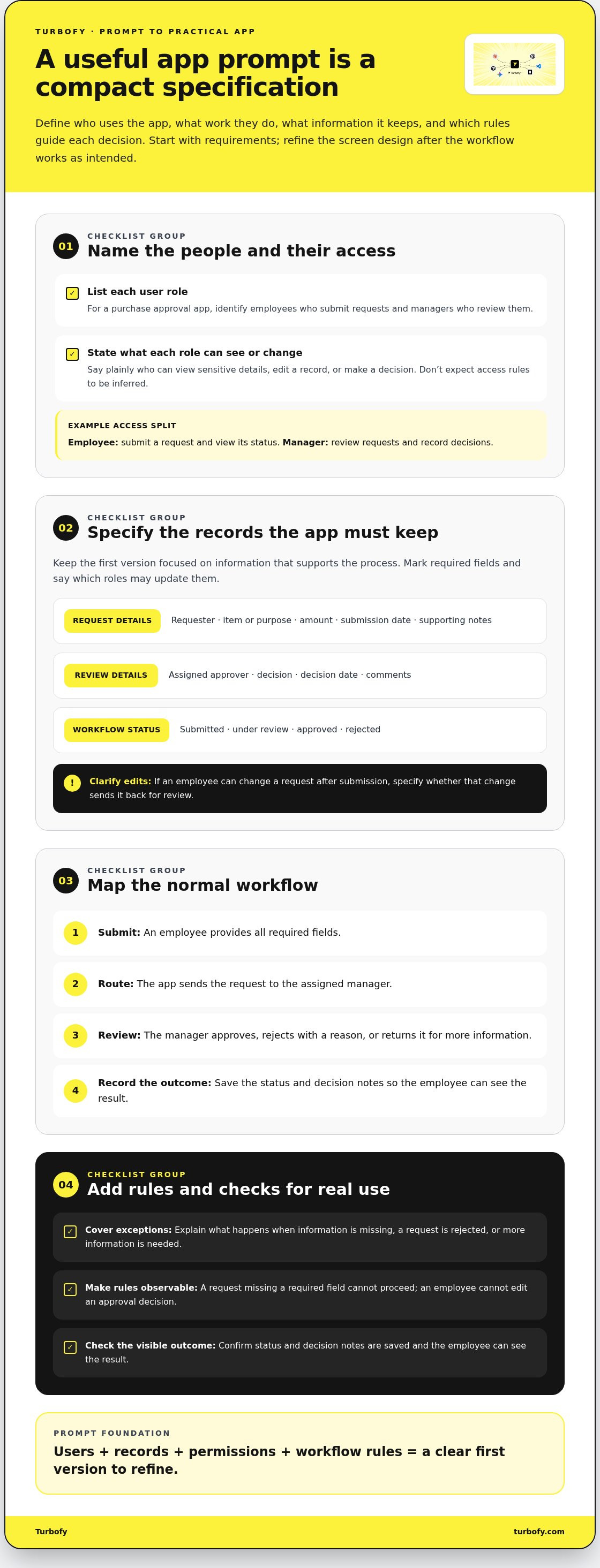
A strong app prompt is a compact specification, not a wish list of features. It tells the builder who will use the app, what work they need to complete, which information the app must retain, and what rules shape each decision. That gives the first version a clear purpose while leaving room to refine it.
App requirements define what people can do and what the system must enforce; interface preferences define how those actions look on screen. Start with the requirements. Refine labels, layout, and visual style after the core workflow behaves as intended.
Specify users, records, and permissions
Name each role and describe what that person needs to see or change. In a purchase approval app, an employee might submit a request and view its status, while a manager reviews requests and records decisions. State access rules plainly. Don’t assume a prompt builder will infer who should see sensitive details or edit a record.
Then define the records the app needs to store. Keep the first version focused on information that supports the process:
-
Request details: requester, item or purpose, amount, submission date, and supporting notes.
-
Review details: assigned approver, decision, decision date, and comments.
-
Workflow status: submitted, under review, approved, or rejected.
Specify which fields are required and which roles can update them. If an employee can change a request after submission, say whether the change sends it back for review.
Describe workflow rules and success criteria
Map the normal sequence from start to finish, then add exceptions that change what happens next. A useful prompt explains what the app does when information is missing, an approver rejects a request, or a request needs revision. These rules help prevent a polished screen from concealing a broken process.
-
An employee submits a request with all required fields.
-
The app routes it to the assigned manager for review.
-
The manager approves it, rejects it with a reason, or returns it for more information.
-
The status and decision notes are saved so the employee can see the outcome.
Turn that sequence into observable checks. For example, a submission without a required field can’t proceed; an employee can’t edit an approval decision; a rejection includes a reason; and each role sees only the records allowed by its access rules. Clear checks make it easier to test the generated app and pinpoint what needs refining.
Keep constraints precise, but leave room to iterate. Specify the essential fields, roles, and rules now. Treat optional dashboards or extra notifications as later decisions unless they’re necessary for the workflow. If you’re ready to shape a real prompt, Turbofy’s chat-based app workspace gives you a place to build and evolve an application through conversation. Define the operating logic first, then refine the experience against real requirements.
Three business software examples: prompts, app behavior, and trade-offs
Use a real workflow to shape the prompt, then decide what the app should store, who can act, and how progress is recorded. The examples below are illustrative starting points, not guaranteed outputs or customer case studies. Refine each prompt against the team’s actual process.
| Business need | Sample prompt | App behavior | Key decisions |
|---|---|---|---|
| Request approvals | “Create an internal request app with categories, submitter details, reviewer roles, and pending, approved, and rejected statuses.” | Employees submit and follow requests. Managers review pending items, record decisions, and inspect each request’s history. | Who reviews each category? Can a request be edited after submission? Define any notification or handoff as a requirement, not an assumed feature. |
| Inventory tracking | “Track items, current quantities, and each stock change, including the person responsible and the reason.” | Staff record incoming or outgoing stock. A review view highlights items below a defined threshold. | Who can change quantities? How are corrections logged? Who reviews low-stock items, and how often is stock reconciled? |
| Client onboarding | “Track new clients through required onboarding steps, with an owner and completion status for each step.” | Responsible team members update progress against a shared checklist, from initial details to the agreed completion point. | Which steps vary by client? Who can view client records? What counts as complete, and who maintains the checklist? |
Example prompt: organize internal requests and approvals
Make the approval path explicit. Name the categories employees can select, the submitter details and request fields to capture, and the reviewer assigned to each category. Define whether a manager can approve, reject with a reason, or return a request for more information. A useful history records status changes and decisions, so a manager can see what’s pending and understand what happened before.
Example prompts: track stock or standardize client onboarding
Inventory tracking needs reliable records of items, quantity changes, responsible users, and low-stock review rules. It also depends on ongoing data maintenance: if staff don’t record changes, displayed quantities can drift from reality. Onboarding centers on client details, required steps, responsible roles, and a clear completion test. Its challenge is often exceptions, such as steps that differ by client or tasks waiting on another person.
Compare the operating effort before you build. Inventory may require tighter edit permissions and regular reconciliation. Onboarding may need more branching rules and careful access to client records. Keep the first version focused on the decisions users must make, then test the workflow with realistic records. To turn prompts into business software, specify behavior and trade-offs, not just screens.
Move from first prompt to a dependable app through focused iterations
A generated app is a starting point, not proof that the workflow is ready for everyday use. Build confidence with a repeatable loop: describe the process, generate a version, test it, refine what fails, and deploy only when the requirements are met. Each pass should answer a specific question, not add features for their own sake.
-
Describe: State the goal, users, records, rules, and expected result.
-
Generate: Create an initial version that covers the main workflow.
-
Test: Run realistic scenarios for each role, including correct and incorrect inputs.
-
Refine: Use observed gaps to clarify the prompt and adjust the app’s behavior.
-
Deploy: Move to real use when core checks pass and the team is prepared to maintain the process.
Keep visual polish separate from operational correctness. A clean interface can still save the wrong status, expose a record to the wrong role, or allow a step that business rules should block. Test data, permissions, and workflow logic first. Improve layout and labels once the app behaves correctly.
Test the app against real operating scenarios
Use representative test records and walk through both the normal path and exceptions. Submit a complete request, then try one with a missing field. Check what happens when it’s rejected, returned for changes, or updated more than once. Repeat the same steps as each role, verifying that users see only appropriate records and actions.
Inspect the record after each transition. Can a user tell who acted, what changed, and what must happen next? Confirm that statuses remain consistent after repeated edits and handoffs. Keep a short list of failures, expected behavior, and the prompt or rule that needs clarification. That turns feedback into focused iteration.
Know when the app is ready for real users
Readiness means core workflows work consistently, acceptance checks pass, and the people responsible know what to do when records or rules need attention. Decide who maintains data, updates the workflow as it changes, and reviews user feedback. A successful test today doesn’t remove the need for ownership tomorrow.
Match the review effort to the app’s risk. A lightweight team tracker may need straightforward role and workflow checks; an app affecting sensitive information or consequential decisions deserves additional review before launch. Define who must approve that review and what evidence they need. Don’t treat an attractive prototype as a production decision.
Use this loop to turn prompts into business software that fits real work, then keep validating it as the process evolves. Build and refine your business app in Turbofy, a chat-based workspace for iterative development and deployment.
Build and evolve business software in Turbofy’s chat-based workspace
The examples in this article share one pattern: a business process becomes an app when its users, records, steps, and rules are clear. Turbofy’s chat-based app development workspace gives teams a place to describe those requirements, shape an application, and continue evolving it through conversation.
Start with one focused scenario, such as tracking internal requests. Describe who submits them, what information each request contains, who reviews it, and how it moves from pending to resolved. Then refine the requirements as the app takes shape. The first prompt is a starting point, not a design that has to stay fixed.
Use conversation to shape an app around a business process
Keep each iteration tied to a practical question: does the right person see the right record, can they complete the next step, and does the app preserve the correct status? Use the acceptance checks established during planning to test each change. If a manager should see all pending requests while employees see only their own, make that rule explicit and verify it as the app evolves.
The same approach applies to inventory tracking or client onboarding. Describe the records and workflow in plain language, review what the app produces, and clarify anything that behaves differently from the process your team intends to follow. Small, deliberate refinements make it easier to identify which requirement caused a mismatch.
Continue building, hosting, and improving in one workspace
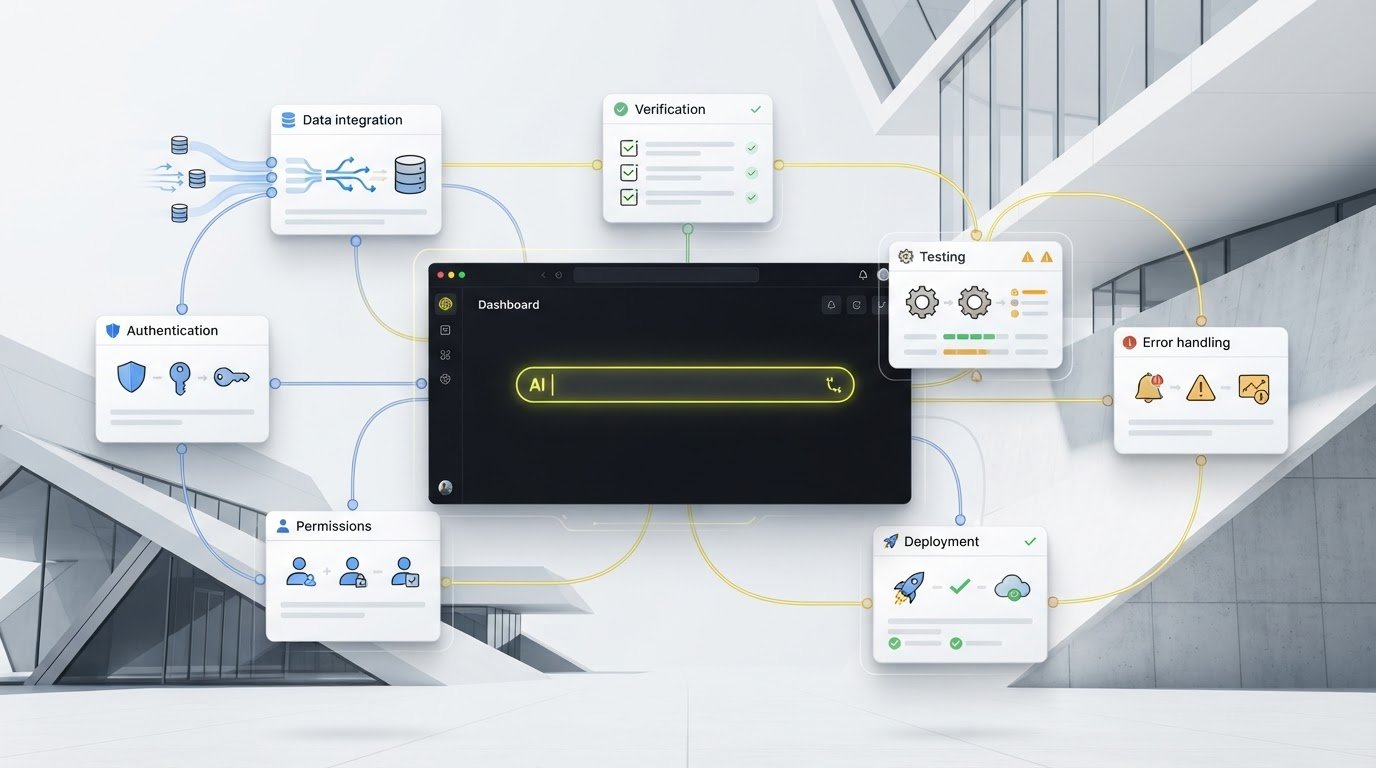
Turbofy brings app development and managed hosting into the same workspace. It also combines data handling, authentication, and workflow automation, connecting key parts of the build process rather than treating the app as a prompt-generated screen alone. Teams can use one shared environment to build, host, and evolve business applications.
The platform integrates with Claude, ChatGPT, GitHub Copilot, and Gemini. These AI tools may support different approaches to a build, so focus first on the business outcome and requirements, then use conversation to develop and refine the app against them.
A prompt-led workspace can speed up the path from an operational idea to a testable application, but it doesn’t remove the need to validate the workflow before relying on it. Keep checking roles, data, and business rules as requirements change. When you have a concrete process in mind, explore Turbofy’s workspace to start building and continue improving the app as your team learns what it needs.
Give your next business idea a place to grow
The best next step isn’t to design every screen. Choose one workflow your team wants to improve, and define what a useful first version would let people do. Keep the goal small enough to test with real users, then let their experience shape what comes next.
That’s how you turn prompts into business software without treating the first generated app as the finished answer. Progress comes from making the process clearer, checking that the app supports it, and improving the parts that matter to your team.
Turbofy brings chat-based app development together with data handling, authentication, hosting, and workflows, with integrations for Claude, ChatGPT, GitHub Copilot, and Gemini. If you have a process ready to explore, turn your business idea into an app with Turbofy.
Start with one clear need. Build from there.
Frequently Asked Questions
Can a prompt create business software that is ready for real users?
It can create a useful starting point, but a generated app isn’t automatically dependable in daily operations. Before rollout, check that the app handles typical and unusual cases, that access matches each role, and that records remain accurate through the workflow. Consider the impact of a mistake: a simple task log carries different risk from an app that influences payments or important decisions. Test with representative users before relying on it.
What should I include in a prompt for a business app?
Describe the business goal, users, workflow, records, required fields, access rules, exceptions, and checks that define success. For example, “track requests” could become: employees submit a request with a category and due date, a team lead assigns an owner, and the requester can see whether it’s open, waiting for information, or complete. Add details through follow-up prompts as you uncover missing rules or unclear steps.
Do I need coding experience to turn prompts into business software?
You can begin without writing code, because conversational app-building lets you describe the process in everyday language. You still need to understand how the work should run: who acts, what information matters, and what outcome counts as complete. Be ready to test the result, too. Technical knowledge may become useful for complex integrations, unusual requirements, or processes where mistakes have significant consequences.
How do I know whether my prompt-built app is more than a prototype?
Look for evidence that the app supports repeatable work, not just a successful demonstration. Write down a few acceptance checks, such as whether a team member can complete a task without manual correction and whether another role is prevented from changing a restricted record. Test those checks with the intended users and realistic data. Also assign someone to maintain the app as its process or records change.
Can I build an app for an existing business workflow instead of starting from scratch?
Yes. First document how the workflow operates now, including handoffs, repeated data entry, bottlenecks, and cases that follow a different path. Then separate necessary controls from habits that only exist because the current tools make the work difficult. For example, preserve who must approve a request while exploring whether staff can avoid copying the same details into multiple records.
What happens after the first version of a business app is generated?
Put it through a focused improvement cycle: run the main workflow, record where behavior differs from expectations, refine the requirements, and retest the changed steps. Ask users where they hesitate or need workarounds; those moments often reveal a missing rule or unclear instruction. Keep ownership ongoing, too. Someone should review data quality and update the app when the business process changes, rather than assuming the first version will stay suitable.