How to Build Production-Ready Apps with AI: A Practical Guide
A practical guide to turning AI-generated prototypes into dependable business apps with clear requirements, sound data and access foundations, and workflow testing before and after launch.
Turbofy Team
By Turbofy®
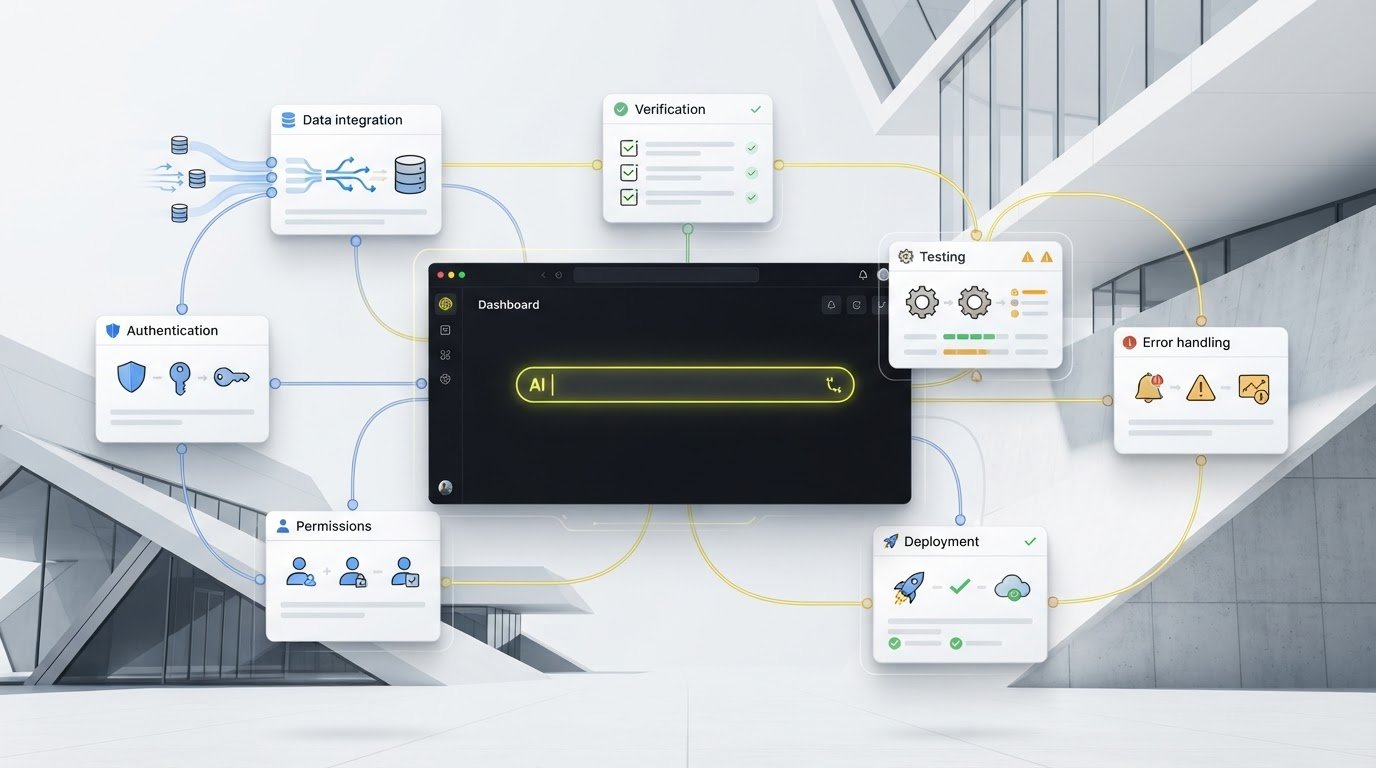
A polished AI prototype can still be one broken workflow away from letting real users down. To build production ready apps with AI, you need more than a clever prompt: the data, permissions, and everyday actions must work together when people rely on them.
AI can turn a business idea into a working interface quickly, but speed alone doesn’t make an app dependable. Prompt changes can introduce bugs, and a demo may leave important behaviors unclear. This guide shows you how to turn a business need into specific requirements, build a solid foundation, and verify that the app supports real user workflows before launch.
Follow a repeatable build-and-verify loop instead of searching for one perfect prompt. Define how the app should handle data, access, and errors, then test those behaviors before and after deployment. Turbofy’s chat-based workspace brings data management, authentication, hosting, and workflows together, with integrations for AI assistants such as Claude, ChatGPT, GitHub Copilot, and Gemini. Use AI to move faster, then verify each change before real users depend on it.
Key Takeaways
-
Define production readiness by the users, workflows, data, and maintenance needs the app must support, not by how polished its prototype looks.
-
Map users, workflow steps, data, rules, outputs, and exceptions before asking AI to generate an app.
-
To build production ready apps with AI, verify the foundations: data behavior, access controls, error handling, and repeatable outcomes.
-
Set acceptance tests for high-impact workflows, test the relevant user roles, then use feedback to guide improvements after deployment.
-
Use Turbofy’s integrated data handling, authentication, hosting, and workflow automation to support an iterative build process, with AI assistant integrations as part of the workflow.
Table of Contents
-
What makes an AI-built app production-ready, not just a polished prototype?
-
How AI app building works: turn a business need into usable software
-
Can AI-built apps be trusted in production? Check the foundations first
-
How to test, deploy, and improve an AI-built app before launch
-
Build production-ready business apps with AI in the Turbofy workspace
What makes an AI-built app production-ready, not just a polished prototype?
A clickable demo can impress in a meeting. A production app has to keep working when people use it with real records, different permissions, and tasks that don’t follow a script. That’s where attractive prototypes often fall short: a screen may look finished even though its data or actions still rely on placeholders.
Production readiness means an app reliably supports its intended users, workflows, and data, with a clear way to maintain it as needs change. It doesn’t mean the app can never fail. It means the team has defined what must work, tested those expectations, and knows how to respond when something goes wrong. Practices such as MLOps reflect this broader view: deploying an intelligent system is only part of the job; operating and maintaining it matter too.
Prototype versus production app: what changes?
A prototype often proves a single happy path: a user enters expected information, clicks a button, and sees the intended result. A dependable app also handles foreseeable variations, such as missing fields, duplicate records, an unauthorised user, or an action that fails partway through.
Sample data can show how a screen looks, but it can’t prove that real records save correctly or remain accurate when people update them. The acceptance bar rises when several roles work with shared information or the app is used repeatedly. For each role, list what the person can view and change. Then repeat the same task to confirm that it produces a predictable result each time.
Set a realistic production-readiness bar
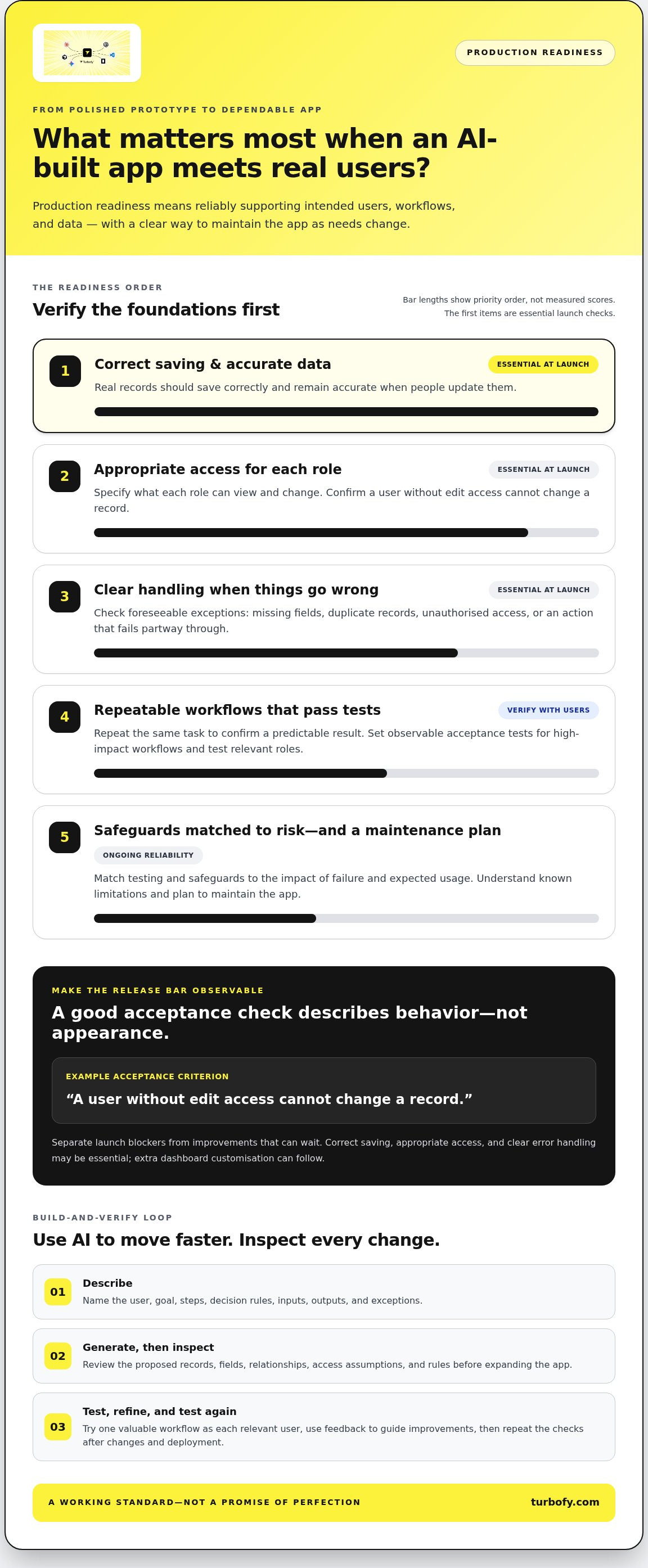
Start with the people who will use the app, their essential tasks, and the impact of failure. A missed internal reminder may be inconvenient; an incorrect change to a business-critical record can have wider consequences. Match testing and safeguards to that risk and to expected usage, rather than treating every app as equally critical.
Separate launch blockers from improvements that can follow. Correct saving, appropriate access, and clear error handling may be essential, while additional dashboard customisation can wait. Write acceptance criteria in observable terms, such as “a user without edit access cannot change a record.” That gives everyone a shared basis for the release decision and helps you build production ready apps with AI without chasing an impossible promise of zero defects.
Keep the bar explicit and practical: launch when essential workflows pass their agreed checks, known limitations are understood, and there’s a plan to maintain the app. That’s a working standard, not a claim of perfection.
How AI app building works: turn a business need into usable software
Start with the job the app must do, not a screen you want it to copy. A reliable build loop moves from users and workflows to data, a generated app, hands-on testing, and refinement. Complete one valuable workflow first, then expand. This keeps the scope focused and makes it easier to see whether each change improves the result or creates new friction.
Precise requirements give AI a map of the intended behavior, so the app is more likely to support real tasks instead of guessing at them. The goal isn’t to write a perfect mega-prompt. Make decisions visible, inspect what the AI builds, and correct assumptions early.
Write prompts that describe real users and workflows
Name the user, their goal, and what counts as a successful outcome. For example: “A team member submits an expense for review. A manager approves it or returns it with a reason.” Then describe the steps, decision rules, inputs, and expected outputs in plain language.
Include exceptions: What happens if the amount is missing, the receipt isn’t attached, or the manager returns the submission? These cases give the AI specific behavior to build and give you clear outcomes to test.
Build the data model and interface around the task
Before asking for screens, list the records the workflow needs. An expense flow might use an expense record with an amount, date, submitter, status, and receipt, linked to the reviewing manager. Decide which fields are required and which actions change the status.
Connect each interface element to a task and data outcome: a submit button creates a record, while an approval action updates its status. Ask the AI to explain its assumptions about fields, relationships, and rules. Review those assumptions before adding more workflows or complexity.
Keep the first version focused. Generate the end-to-end path for one high-value task, then try it as each relevant user. Check whether information is saved as expected, rules are applied, and exceptions lead to clear next steps. Refine the requirement or implementation based on what you observe, then test again.
A useful prompt might say: “Build an expense review workflow for employees and managers. Employees submit an amount, date, and receipt. Managers can approve or return a submission with a reason. Explain your proposed records and access assumptions before creating the screens.” That’s more actionable than “make an expense app” because it names the roles, information, decisions, and expected behavior.
Use this conversational loop to build production ready apps with AI: describe, generate, inspect, and refine. A chat-based workspace such as Turbofy’s app development workspace supports moving from requirements into an evolving business application, while you stay responsible for decisions and verification.
Can AI-built apps be trusted in production? Check the foundations first
Generated code is not proof of a reliable app. A demo that works once with sample data isn’t proof either. A convincing prototype shows that an idea can appear on screen; evidence for production shows that the app handles real records, appropriate access, failures, and repeat use as intended.
Check the foundations that matter to the app’s purpose and risk. An internal planning tool and an app that changes sensitive business records don’t need identical safeguards. Use the questions below to turn “it seems to work” into evidence you can review.
| Readiness area | Prototype evidence | Production check |
|---|---|---|
| Data | A sample record appears on screen. | Do valid, missing, duplicate, and unexpected values produce the intended result without corrupting records? |
| Access | A user can reach the main screen. | Can each role view and change only the appropriate records and actions? |
| Errors | The happy path completes. | If a required step fails, does the app explain what happened and provide a safe next step? |
| Repeatability | A workflow succeeds once. | Does it behave consistently when repeated, including after a user updates an existing record? |
Test data, access, and failure handling
Test more than ideal inputs. Try a missing required field, a duplicate submission, and values outside the expected range. Then sign in as each relevant role and attempt actions that role shouldn’t be able to take, such as changing another team member’s record. If a workflow can’t complete, check that the app preserves data safely and gives the user a useful explanation, rather than failing silently or leaving them at a dead end.
Check reliability, privacy, and change safety
Run important workflows repeatedly and compare the outcomes. Review what personal or business information the app collects, which workflow steps use it, and where it is sent or stored. Focus security checks on plausible risks and the impact of failure. These checks can inform a release decision, but they aren’t a certification or a guarantee of security. After changing a prompt, rule, or screen, rerun critical workflows to catch regressions.
Keep a short record of checks, results, and unresolved limitations. If a failure could expose information, alter important records, or block an essential task, treat it as a release issue and address it before launch. This evidence-led approach helps you build production ready apps with AI by verifying the whole user experience, not just the generated interface.
How to test, deploy, and improve an AI-built app before launch
Move from build to launch through a controlled loop: define acceptance tests, run them as the relevant users, fix failures, deploy, and learn from feedback. Prioritize by business impact. A failure that blocks an essential task or changes an important record deserves attention before a cosmetic issue.
A focused first release can reveal workflow gaps that weren’t obvious during development. Keep its scope manageable and learn from real use, but don’t treat success with a small group as proof that the app will handle every future workload. Expand deliberately, with checks that match each new use case.
Create a focused pre-launch test plan
Turn each launch-critical requirement into a test with a visible result. For example: “When a manager approves a submitted request, its status changes to approved and the submitter can see the update.” Run each key workflow as every relevant role, including tests of actions that should be blocked.
Keep a simple issue log: what happened, the steps to reproduce it, the expected result, and the observed result. Fix the issue, then repeat the original test. Don’t rely on a quick look at the changed screen; a fix can affect other parts of the workflow.
-
Test the critical path: Can users complete the main task from start to finish?
-
Test likely failure points: What happens with incomplete information or an unavailable step?
-
Retest after changes: Do the fix and surrounding actions still behave as expected?
Deploy carefully and learn from real use
After the pre-launch checks pass, test the deployed app using realistic data and the intended user journey. Confirm that core actions still work in the live version, then invite a small initial group to try the specific tasks the app supports. Watch for incomplete tasks, confusing steps, and exceptions the test plan missed.
Ask focused questions: Where did you get stuck? Which step was unclear? What information or exception was missing? Sort feedback by impact, update the app in deliberate batches, and rerun the tests affected by each change before the next release. This creates a repeatable improvement cycle without assuming every request belongs in the product.
To build production ready apps with AI, treat launch as the start of learning, not the end of testing. Explore Turbofy’s app development workspace to build, host, and evolve business applications in a chat-based workspace.
Build production-ready business apps with AI in the Turbofy workspace
Turn requirements into an app while keeping the practical foundations in view. Turbofy is a chat-based workspace for building, hosting, and evolving business applications. It brings data handling, authentication, hosting, and workflow automation together, so you can shape a business process into an application rather than stopping at a clickable mock-up.
For example, imagine an app that collects internal requests and routes them for review. Describe who submits a request, what information it needs, who can review it, and what should happen after approval. Then connect that workflow to the records and access rules it depends on. The goal is a coherent working flow, not a collection of screens with no dependable path between them.
Bring app foundations into one build workspace
Keep the core pieces connected as you build. Data handling supports the records behind the workflow, authentication establishes who is using the app, and workflow automation connects actions to the next step. Hosting gives the application a place to run beyond a local prototype. These capabilities create a practical foundation for continued development, but they don’t remove the need to define access carefully or test how the app behaves.
Use your requirements to guide each change. If a request form needs a new field, decide what it means, whether it’s required, and how it affects later actions before asking the AI to add it. That keeps the data model, interface, and workflow aligned as the application evolves.
Keep iterating with AI assistants and feedback
Turbofy integrates with AI assistants including Claude, ChatGPT, GitHub Copilot, and Gemini. Use an assistant to translate clear instructions into app changes, then review the result against the intended user task. Test the workflow, note what failed or felt unclear, refine the requirement, and verify the change again. AI can speed up iteration; your team still sets priorities and validates the application’s behavior.
This loop helps you move from a business need to a working application and keep improving it with feedback. To build production ready apps with AI, pair conversational building with deliberate review at every step. See how Turbofy’s app development workspace supports this process.
Turn your AI-built idea into a working business app
Production readiness isn’t a perfect prompt or a polished demo. It’s a repeatable process: define who the app serves and what they need to do, build around real data and roles, then test the workflows that matter before and after launch.
As you build production ready apps with AI, prioritize the checks that match your app’s purpose and risk. Verify expected outcomes, handle realistic exceptions, and retest critical tasks after changes. Then use feedback from real workflows to decide what to improve next.
Turbofy brings app development, data handling, authentication, hosting, and workflows into one workspace. Integrate Claude, ChatGPT, GitHub Copilot, or Gemini to support iteration, while your team defines requirements and validates each result. Move from idea to a business application you can keep evolving.
Build and evolve your business app with Turbofy, and put your next workflow in motion.
Frequently Asked Questions
Can you build a production-ready app with AI?
Yes. AI can help generate and refine an app, but production readiness takes more than working screens or code. Define what users need to do, then check how the app handles data, access, errors, and essential workflows. Test the deployed experience, too. The depth of review should match the app’s purpose and the consequences of mistakes. An internal task tracker and an app handling important business records may need different checks.
What makes an AI-generated app production-ready?
An AI-generated app is production-ready when it reliably supports its intended users and essential workflows, with suitable data handling, access controls, error behavior, and testing. There’s no universal badge that proves readiness, and no app is guaranteed never to fail. Set observable acceptance criteria based on your app’s risks, verify them before release, and revisit them as the application and its workflows change.
How do you build an app with AI step by step?
Start by naming the user and the task the app must solve. Map the workflow, required data, decision rules, and likely exceptions. Ask AI to build a small but complete version of that workflow, then test its important roles and outcomes. Fix issues, deploy carefully, and gather feedback from actual use. After meaningful changes, repeat the relevant tests so each iteration improves the app without quietly breaking existing behavior.
Is AI-generated code safe to use in a business app?
AI-generated code can be used in a business app, but review and test it rather than trusting it automatically. Check who can access records and actions, how sensitive information is handled, what happens when a workflow fails, and how external connections behave. Match the depth of review to the possible impact of a mistake. For higher-risk applications, involve appropriate technical expertise. Generated output is not a security certification.
Can a beginner build a business app with AI?
Yes, beginners can use conversational tools to describe a workflow and generate an initial app, especially when the scope is clear. Start with one bounded task, such as submitting and reviewing a request. The key work is defining what users need, checking realistic cases, and deciding how data and access should behave. Use test results to refine the app, then expand only when the essential workflow works as expected.
What should you test before deploying an AI-built app?
Test the main user journey from start to finish, using expected inputs as well as missing or unusual data. Check relevant roles, confirm that each action produces the intended result, and make sure failures give users a clear next step. Test the deployed app with realistic data, not only the development preview. After changes, rerun critical workflows to confirm that a fix hasn’t caused a regression elsewhere.
What happens if an AI app works in a demo but fails with real users?
Treat the failure as a clue that the demo missed a real workflow, data condition, user role, or integration behavior. Reproduce the issue and identify which requirement wasn’t met. Then update the app and add or revise a test for that case. Before releasing the change, verify the affected journey again. This feedback-and-test loop helps address the gap and reduces the chance of the same failure returning.