Business App Builders for Non-Developers: Compare Costs and Security
Compare the costs, security controls, and trade-offs of business app builders for non-developers to choose the right platform for your team.
Jens Dressler
By Turbofy®
The best business app builder for non-developers is one that fits your workflows and gives you clear control over business data. Compare pricing alongside authentication, permissions, and security features before choosing. A low starting price means little if essential controls are only available on a plan you don’t need.
You want to launch an app without getting stuck in code, but speed shouldn’t come at the expense of security or predictable costs. A practical comparison makes those trade-offs clear before you commit.
This guide explains how no-code builders work and what to assess for business use in Germany. You’ll learn how pricing models affect costs, how authentication differs from permissions, and which security capabilities matter when an app handles internal or customer data. Then you can match a builder to the work your team needs to do.
Key Takeaways
-
Compare the complete pricing model, including how usage-based credits may affect costs as your app grows.
-
Assess whether a builder can support your business workflows and the level of customization they require.
-
Separate authentication from permissions to understand who can sign in and what each user can access.
-
See how Turbofy’s workspace, hosting, AI integrations, and Free Tier can support building business apps without traditional coding.
Table of Contents
Are no-code apps secure enough for business use?
No-code apps can support business processes when access controls, auditability, and data ownership fit the information involved. For inventory, bookings, or internal workflows, start with the task and its data and logic, then assess security, scalability, and portability.
Custom business software turns a company process into an app, rather than forcing teams into generic tools. Traditional development typically takes four to nine months from planning through deployment. A visual builder can shorten that path, especially for a stock register, booking calendar, or approval workflow. The best fit is the builder that handles the real process clearly, not simply the one with the most templates.
Internal Tools and Customer Portals
Internal tools help employees manage work, while customer portals let customers complete tasks or view information. A warehouse team might record incoming items in an internal stock app; a customer portal might display booking details. Both can reduce reliance on scattered spreadsheets and email threads. Their value depends on useful screens, clear data ownership, and access designed for each audience.
Teams use app builders to shape forms, screens, and workflows around how people work. A booking app, for example, can collect appointment details, while an inventory app can show stock status. A business app builder for non-developers should make these changes approachable through visual logic and configuration. Tailored labels and shorter forms can make an app easier to use without forcing staff through irrelevant fields.
Security, Scalability, and Vendor Lock-In
Security risks arise when users see records they shouldn’t, or when changes lack an audit trail. Map each role to the data and actions it needs, then review access control, auditability, and structured ownership. Scalability matters when more users, records, or workflows strain an app’s design. Vendor lock-in becomes a risk when moving data or rebuilding workflows depends heavily on one platform. Review data export and how core logic can be transferred before committing.
What Is a Custom App Builder for Non-Technical Users?
To build and launch an app, define one workflow, organize its data, configure screens, then test and publish it. A booking tool, for example, needs appointment fields, user actions, and a clear view of available slots.
For CRM, payment, spreadsheet, and accounting connections, compare each platform’s integrations and data flows. A useful connector moves the right information between your app and existing tools.
No-Code App Development
No-code development uses visual logic, drag-and-drop interfaces, and configuration instead of programming. A team can create a service-request form, connect fields to records, and define what happens after submission. Simple apps may take hours or days to assemble; more complex projects take longer. This approach helps process owners turn familiar workflows into usable software without writing code.
Benefits and Limitations of No-Code Builders
No-code builders can speed up delivery and let teams adjust screens as processes change. For example, an operations lead can add a status field to an approval app without waiting for a coding cycle. Challenges can arise when workflows need advanced customization, unusual data structures, or unsupported capabilities. A business app builder for non-developers works best when its building blocks match the actual process.
Evaluating Platform Features and Integrations
Assess a platform by testing whether it supports your data model, workflow logic, user experience, and required integrations. For a CRM connection, map which customer fields the app reads or updates. For payments, define the transaction flow; for spreadsheets and accounting, clarify which records move and when. Compare no-code AI app builders on how their AI features fit these tasks, not just on how quickly they generate screens. For an AI-led build flow, explore the Turbofy App Development Workspace.
No-Code and Low-Code Platforms
No-code platforms are designed for building apps without programming, while low-code platforms may require coding for advanced customization. That distinction matters when a workflow outgrows standard visual components. No-code can suit a straightforward booking process; low-code may better fit a specialized rule that needs custom code. Match the approach to your team’s technical capacity and the app’s complexity.
App pricing and credit-based plans
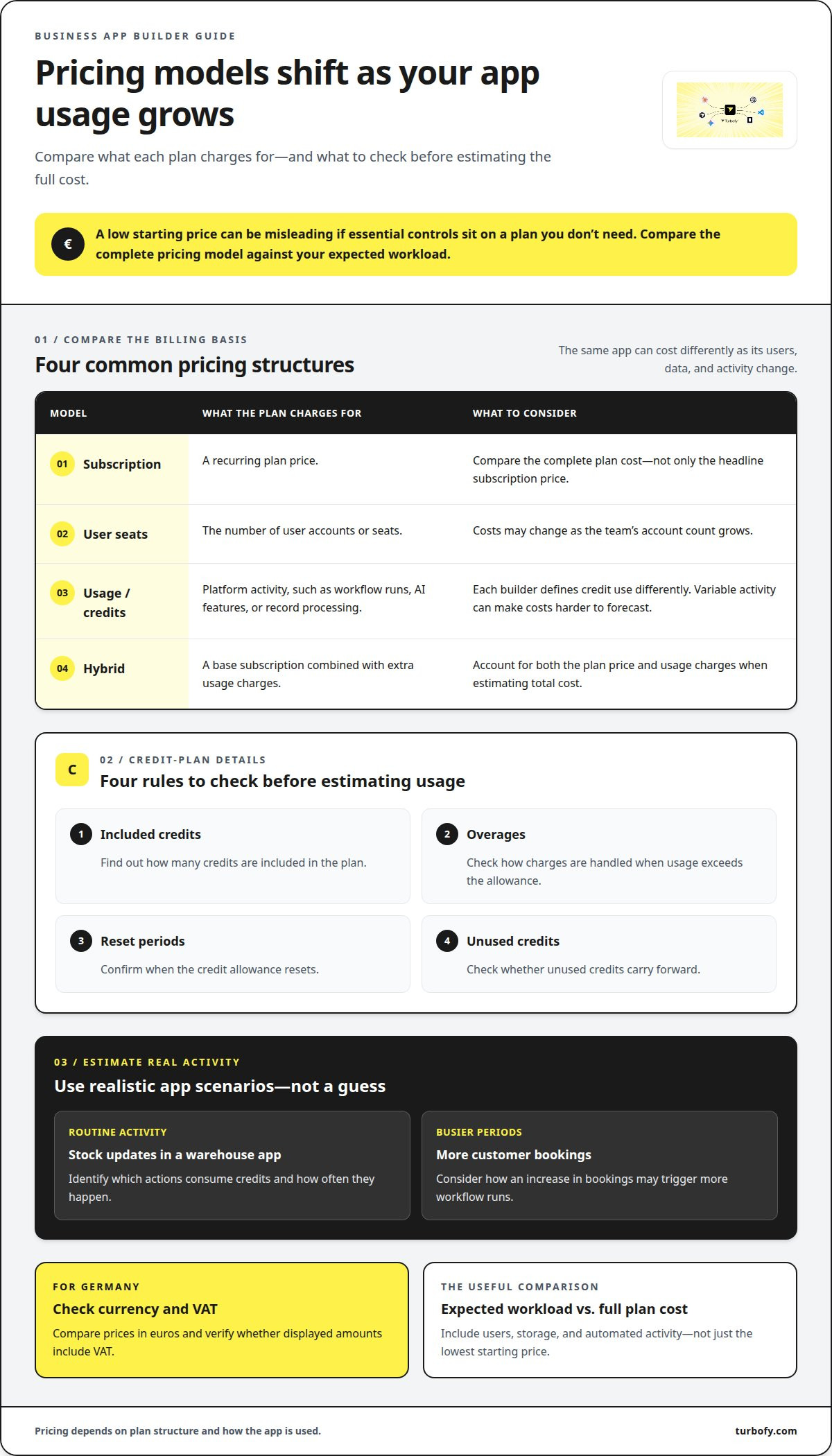
Compare what each plan charges for, not just its headline subscription price. A warehouse app’s costs may change as its user list, data storage, or automated activity grows. In Germany, compare prices in euros and check whether displayed amounts include VAT. The right comparison reflects your expected workload, not just a low starting figure.
Platforms commonly structure pricing around subscriptions, user seats, usage, or a combination. A per-user model ties costs to the warehouse team’s account count. A usage model may charge credits when the app runs workflows, uses AI features, or processes records. A hybrid plan can combine a base subscription with extra usage charges. Each model affects costs differently as adoption grows.
Understand credit-based billing
Credits represent platform usage, but each builder defines what consumes them. A workflow that updates inventory, for example, may use credits each time it runs, while an AI-generated action may be counted differently. Read the plan’s credit rules and identify which app actions trigger usage. Then estimate activity using realistic scenarios, such as routine stock updates and busy booking periods.
Credit plans can make low activity economical, but variable usage can make budgets harder to forecast. A sudden increase in customer bookings may trigger more workflow runs. Compare included credits, how overages are handled, reset periods, and whether unused credits carry forward. These details matter more than a large allowance if your app’s usage is unpredictable.
Compare the full cost of use
Build a like-for-like comparison using one example app, such as an appointment tool. Include the users who need access, the records it stores, the integrations it relies on, and the workflows it runs. Check whether publishing, custom branding, support, or data exports affect the plan. Don’t assume features shown in a demo are included in every tier.
Test your assumptions against a pilot workload before a broader rollout. Track which actions consume credits and whether usage changes as staff adopt the app. A free plan can help you explore a builder, but may not represent the cost of a production setup. Choose a plan whose limits and billing logic match how your team will use the app.
Authentication, permissions and security
No-code apps can support GDPR-conscious business use, but a platform alone doesn’t make an app compliant. Map where customer data is stored and processed, including through connected services, and review how the app is configured and used.
Separate sign-in from access
Authentication confirms who is signing in; permissions define what that person can do. A booking app might let a receptionist view appointments while restricting access to customer records. Evaluate sign-in options such as multi-factor authentication, along with role-based access that limits each user to the screens, records, and actions they need. Shared logins weaken accountability because activity can’t be clearly tied to an individual.
Start with a role map. List user groups, such as administrators, staff, and customers, then assign only the data and actions each group needs. In an inventory app, warehouse staff might update quantities while managers approve adjustments. Test each role with a separate account, and make sure restricted actions are protected by permissions, not just hidden buttons.
Review data handling and auditability
For a German business handling customer data, identify the app’s data flows before launch. Trace a sample record from a form through storage, exports, and connected tools. Note where primary records, backups, and integration data are hosted. GDPR compliance depends on how the business collects, uses, stores, and protects personal data, as well as on platform configuration and internal practices.
Auditability helps explain what changed and who changed it. A booking team, for example, should be able to investigate an unexpected appointment edit. Review whether logs capture relevant actions, how long records remain available, and who can access them. Also assess how the app handles account removal, data export, and workflow errors. These controls support oversight but don’t replace sound data practices.
Test the permission model with realistic staff and customer scenarios before launch. Explore an app-building workspace as you assess how authentication, permissions, and data handling fit your workflow.
Turbofy: Turbofy App Development Workspace
Turbofy gives non-developers a practical way to turn a business workflow into an app. Its AI-driven chat interface brings app building, data handling, authentication, hosting, and workflow automation together in one workspace.
Describe the process you want to improve, then shape the app around its data and actions. Turbofy also offers AI Agent Integrations with Claude, ChatGPT, GitHub Copilot, and Gemini, which can fit teams already using those assistants. Managed App Hosting supports the deployment side, while the Free Tier offers a way to explore the workspace.
If you’re ready to develop a business app without starting from code, visit Turbofy to explore the workspace.
Move from idea to a focused first build
Choose one workflow with a clear owner and a real business need. Define what should improve for the people using it, then list the essential actions the app must support. Keep the first release focused. A smaller scope makes it easier to gather feedback and decide what deserves attention next.
Choosing a business app builder for non-developers becomes more practical when your team has a specific use case to test. Create a brief that identifies the intended users, workflow, and outcome you want to improve. Use it to keep decisions grounded in the work, not a long feature wishlist.
Ready to turn that brief into a business app? Contact Turbofy about your app, and take the next step at your pace.
Frequently Asked Questions
Which no-code AI app builder should you choose?
Choose a builder that can turn your workflow into an app your team can maintain. Test it with a representative task, such as turning a service request into an assigned job. Compare how clearly you can adjust the result, connect it to existing tools, and prepare it for deployment. Turbofy combines an AI-driven chat interface, app hosting, and AI agent integrations in one workspace.
Is there a free AI app builder without coding?
Yes, some platforms offer a free tier for building without code. Turbofy offers a Free Tier, which can give a team a way to explore an AI-driven app-building workflow before choosing how to proceed. Try a contained internal task, such as an equipment request form, and see whether the builder fits your process. Check how its plan handles the features and usage your finished app needs.
What is no-code app development?
No-code app development lets people create software through visual tools and configuration rather than writing code. A team could model a staff expense request with fields for receipts, approval status, and department. Start with a process map: identify who submits information, who acts on it, and what outcome the app should produce. That keeps the build anchored to a real business task.
What’s the difference between no-code and low-code platforms?
No-code tools aim to let users build without writing code; low-code tools allow coding for extra customization. A team building a standard equipment booking flow may prefer no-code components. A workflow needing a custom calculation or unusual system behaviour may call for low-code flexibility. Choose based on the most demanding requirement, not just the first screen, so the platform still fits as the app evolves.
What is a business app builder for non-developers?
A business app builder for non-developers helps people without programming experience create applications for work. A finance team, for instance, might shape an expense review workflow around its own approval stages. Unlike a basic form tool, a business app builder can support the connected steps, data, and user actions a process requires.
Which no-code business app builders are best for small businesses in 2026?
There isn’t one best builder for every small business; the right fit depends on its workflows, integrations, data needs, and in-house skills. Compare platforms using the same example task, such as tracking customer enquiries from intake through follow-up. Turbofy may suit teams looking for an AI-driven workspace that combines app building, hosting, and AI agent integrations. Assess the fit against your requirements, then start building your app with Turbofy.