Zapier vs. Custom AI App Builder: Which Fits Your Workflows and Products?
Zapier vs. a custom AI app builder: learn when connecting tools is enough, when you need your own app, and why an all-in-one AI app builder like Turbofy covers both.
Turbofy Team
By Turbofy®

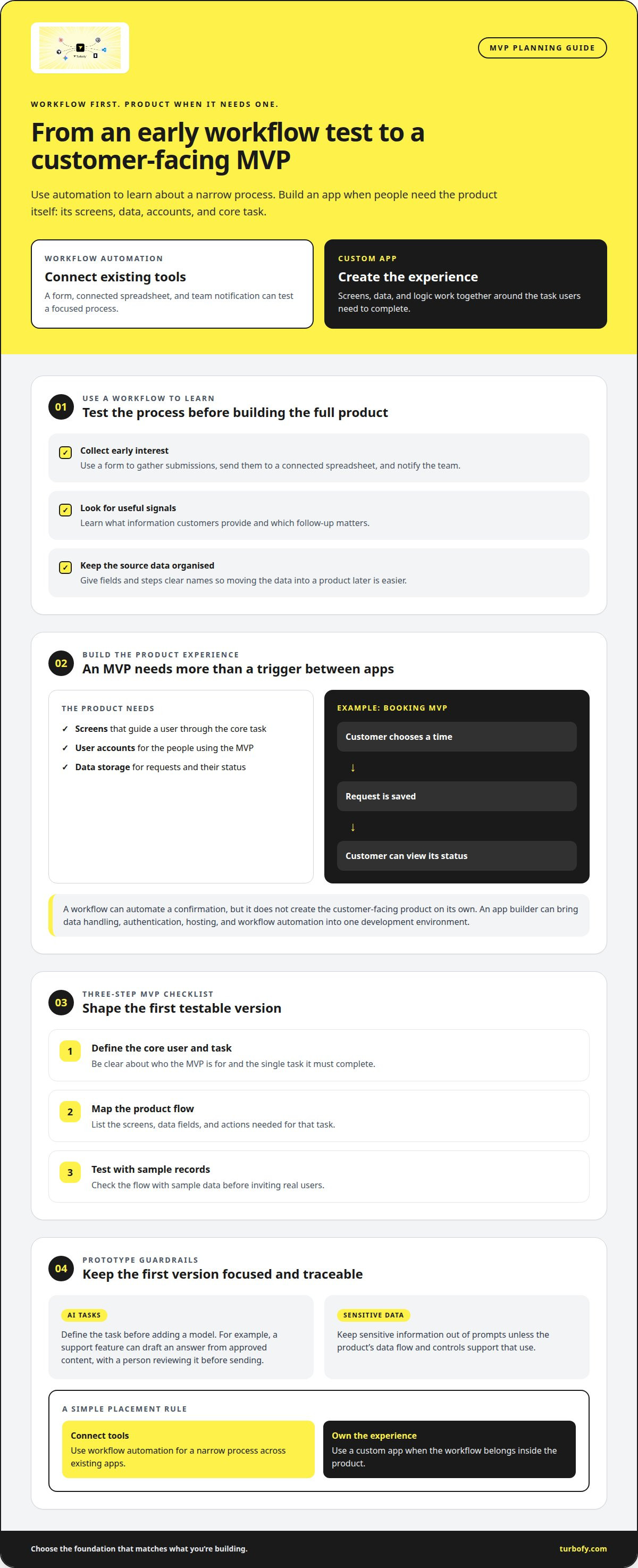
Zapier is excellent at one job: moving data between apps you already use. The moment you need screens your customers log into, a database you own, or logic that is part of a product, you are no longer automating tools. You are building an application. That is where a custom AI app builder takes over.
This guide compares Zapier with a custom AI app builder across the questions that decide the outcome: what you are building, where your data lives, how far the logic needs to go, and what the setup costs once it grows. It also shows why an all-in-one AI app builder like Turbofy, which combines apps, database, authentication, automation and hosting in one workspace, covers both sides of the decision.
Key Takeaways
- Zapier connects existing tools with triggers and actions. It is the right choice for simple, app-to-app automations.
- A custom AI app builder creates the application itself: interface, database, user accounts, business logic and automations.
- Zapier gets expensive and fragile when a product is spread across many Zaps, a separate database, a form tool and a hosting provider.
- Turbofy is an AI app builder that brings frontend, database, authentication, flows, API, file storage and hosting into one workspace, so automations live next to the app instead of around it.
- You can start on Turbofy's Free plan and move one workflow at a time.
Table of Contents
- What Zapier does well
- Where Zapier reaches its limits
- What a custom AI app builder adds
- Zapier vs. custom AI app builder at a glance
- How to decide which approach fits
- Why Turbofy: one AI app builder for apps, data and automation
- Moving from Zapier to Turbofy step by step
- Frequently Asked Questions
What Zapier does well
Zapier is a workflow automation service. A workflow, called a Zap, starts with a trigger in one app and runs one or more actions in others. A new form submission can create a CRM contact, post a message to Slack and add a row to a spreadsheet, without anyone writing code.
Its strengths are real:
- Breadth of integrations. Zapier connects thousands of SaaS products, so the app you need is usually already there.
- Fast setup. A simple Zap takes minutes: choose a trigger, map the fields, test, turn it on.
- Useful building blocks. Filters and Paths add conditions and branching, Formatter cleans up data, Webhooks by Zapier receives and sends HTTP requests, and Code by Zapier runs short JavaScript or Python snippets.
- Clear run history. Each Zap run shows which step succeeded or failed, which makes simple workflows easy to debug.
If your goal is to keep existing tools in sync, Zapier is a sensible, low-effort choice.
Where Zapier reaches its limits
Zapier is designed to connect apps, not to be one. Problems start when a workflow turns into a product or a core business process.
There is no real application layer. Zapier has added Tables for simple data storage and Interfaces for basic forms and pages, but they are add-ons to automation, not a full application framework. Customer portals, role-based screens, custom layouts and multi-step user journeys still need a separate tool.
Your data is scattered. A typical "no-code stack" built around Zapier keeps records in a spreadsheet or Airtable, collects input with a form tool, handles logins somewhere else and hosts the frontend on yet another service. Every hop is another account, another permission model and another place where data can get out of sync.
Complex logic gets hard to maintain. Branching across many Paths, chained Zaps that trigger each other and code steps with no shared source of truth are difficult to review and change. When a business rule changes, you need to find every Zap that depends on it.
Costs grow with volume. Zapier bills by tasks, meaning each successful action step. A workflow that runs often and has several actions consumes tasks quickly, and the monthly bill grows with usage on top of the subscriptions for every other tool in the stack.
Governance is spread across vendors. For GDPR and audits, you need to know where personal data is stored and processed. When it flows through five services, each with its own region, retention and processor agreement, that question gets harder to answer.
None of this makes Zapier a bad tool. It means Zapier is the glue, and glue is not a foundation.
What a custom AI app builder adds
A custom app builder lets you create the application itself instead of connecting other people's applications. An AI app builder goes one step further: you describe what you need in plain language, and an AI agent builds the data model, screens and logic, which you then refine.
A complete AI app builder gives you:
- A user interface for customers or staff, with your own layout, branding and multi-language support.
- A database where your records live, with a schema you control instead of a spreadsheet.
- User accounts and login, so each person sees only the data and actions meant for them.
- Automation inside the app, triggered by changes to your own data, by schedules or by incoming webhooks.
- APIs and integrations, so the app can still talk to the tools you rely on.
- Hosting, so the result runs in production without a separate deployment pipeline.
The key difference: in Zapier, automation sits between products. In an AI app builder, automation is part of the product, working on the same data that your users see.
Zapier vs. custom AI app builder at a glance
| Criteria | Zapier | Custom AI app builder (Turbofy) |
|---|---|---|
| Main purpose | Connect existing apps | Build and run your own app |
| How you build | Visual trigger and action editor | Chat with an AI agent, then refine |
| User interface | Basic forms and pages via Interfaces | Full frontend with custom pages and components |
| Database | Tables as an add-on | Built-in tables with your own schema |
| Login and permissions | Not designed for end-user apps | User accounts and login included |
| Automation | Zaps with Paths, Filters and code steps | Flows with triggers, branches, loops, AI steps and custom code |
| AI | AI steps and agents inside automations | AI builds the app and runs inside flows |
| Hosting | Not applicable | Managed hosting in 12 regions, custom domains |
| Pricing model | Per task | Credits for the whole workspace |
| Best fit | Syncing tools, notifications, simple handoffs | MVPs, internal tools, customer portals, core workflows |
How to decide which approach fits
Ask these questions about the workflow in front of you:
- Who uses it? If only your team's tools touch the data, Zapier can be enough. If customers or staff need to log in and work with it, you need an app.
- Where should the data live? If the source of truth is already in another system and should stay there, connect it. If you are creating new records that matter to your business, keep them in a database you own.
- How often does the logic change? Rules that change frequently belong in one place, not spread across many Zaps.
- How many tools are involved? If the workflow needs a form tool, a spreadsheet, a login provider and a hosting service just to function, an all-in-one AI app builder removes most of that stack.
- What will it cost at ten times today's volume? Estimate task usage on Zapier plus every supporting subscription, and compare it with a single workspace.
A practical rule: keep Zapier for lightweight glue, and build anything that is becoming a product in an AI app builder. Many teams run both for a while and move workflows over one at a time.
Why Turbofy: one AI app builder for apps, data and automation
Turbofy is an AI app builder that replaces the patchwork of an app builder, a database, an automation tool, an integration platform, hosting and file storage with one workspace. Everything is integrated by design, so there is nothing to wire together.
Build by chatting with the AI you already use. Turbofy works with Claude, ChatGPT, GitHub Copilot and Gemini through the Turbofy MCP, with no markup on AI tokens. Describe the app, review what the agent builds and keep iterating in the same conversation.
Apps, database and login in one place. Turbofy apps are built from reusable components on top of your own tables. User accounts and login are available as part of the platform, so a customer portal or internal tool does not need a separate authentication service.
Flows: automation that lives next to your data. Where Zapier connects outside tools, Turbofy Flows run directly on your workspace:
- Trigger on new, changed or deleted records, on a schedule, by manual start or by an incoming webhook.
- Call any HTTP API, so existing tools stay connected.
- Use AI steps to generate text, extract structured data or create images.
- Branch, loop over records and run custom Node.js cloud functions when you need real code.
- Keep API keys in managed workspace secrets instead of pasting them into steps.
- Follow every run in detailed run logs.
Production-ready from day one. Turbofy hosts your app on managed infrastructure in 12 regions, including the EU, with custom domains, file storage and a workspace API. Enterprise customers can get dedicated infrastructure or self-host in their own AWS account, which keeps data residency questions simple.
Predictable pricing. The Free plan includes a one-time budget of 5,000 credits with unlimited apps, tables and flows. The Professional plan starts at €19 per month, billed annually, and one credit budget covers your apps, data and automations instead of separate bills for each tool.
That is the core argument in the Zapier vs. custom AI app builder decision: Zapier makes your existing stack work together, while Turbofy makes most of that stack unnecessary.
Moving from Zapier to Turbofy step by step
You do not need a big migration project. Move the workflow that hurts most first:
- List your Zaps. Note the trigger, the actions and where the data ends up for each one.
- Pick the workflow closest to your product. Look for Zaps that write to a spreadsheet you treat as a database, or that glue a form to an approval process.
- Describe it to the AI app builder. Ask your AI agent to create the tables, screens and flow in Turbofy, for example: "Collect service requests, let managers approve them and notify the customer by email."
- Keep external tools connected. Use HTTP steps or incoming webhooks for the services that should stay where they are.
- Run both in parallel, then switch. Compare results for a few days, turn off the old Zap and repeat with the next workflow.
Frequently Asked Questions
Is Turbofy a Zapier alternative?
For automations that belong to your own app or data, yes. Turbofy Flows cover triggers, branching, loops, HTTP requests, AI steps and custom code. For simple syncs between third-party tools, you can keep Zapier alongside Turbofy or call those tools directly from a Flow.
What is an AI app builder?
An AI app builder is a platform where you describe the application you need in natural language and an AI agent creates it: data model, user interface, logic and automations. You refine the result in conversation instead of writing everything by hand.
Can Zapier build a complete app?
Zapier offers Tables and Interfaces for simple data and forms, which is enough for lightweight internal tools. For a customer-facing product with its own design, user accounts, permissions and complex logic, a custom AI app builder is the better foundation.
Is Turbofy suitable for GDPR-sensitive data?
Turbofy lets you choose where your workspace runs, including regions in the EU, and keeps app, database and automation in one environment. Compliance still depends on how you design and use the app, but a single platform makes it much easier to document where personal data is stored and processed.
Do I need to code to use Turbofy?
No. You build by chatting with an AI agent. When you do want code, Turbofy supports custom components and Node.js cloud functions inside Flows.
Start building your app
If your workflows are turning into a product, stop stretching automations across tools. Start with Turbofy for free and build your first app, database and flow in one workspace, or talk to our team about moving your existing Zaps.