

Build SaaS Apps with Chat: A Founder’s Step-by-Step Guide
A founder-friendly step-by-step guide to building SaaS apps with chat. From shaping your idea and data model to creating workflows, refining the interface, and launching a working product.
Turbofy
By Turbofy®

Build SaaS Apps with Chat: A Founder’s Step-by-Step Guide
What if your first SaaS build decision wasn’t which AI tool to use, but which problem your app should solve? To build SaaS apps with chat, you need more than a clever prompt. You need a clear sequence of product decisions that turns a rough idea into a usable, testable plan.
It’s easy to describe a feature and get a quick result. The harder part is making sure features work together, users can access the right information, and the main workflow solves a real need. That takes deliberate planning, not endless back-and-forth or a pile of disconnected screens.
This guide shows you how to shape your idea into a focused SaaS scope, then build and refine it with clear chat instructions. You’ll define users, data, and workflows first, break development into testable steps, and review the product and technical choices that need your judgment. Follow the process to move from “I have an idea” to a build plan you can iterate on with confidence.
Key Takeaways
-
Start with the problem, target user, and core outcome before you ask chat to shape features.
-
Build SaaS apps with chat by turning product decisions into small instructions with clear acceptance criteria.
-
Keep the first release focused, and choose user roles and permissions that match real workflows.
-
Test complete user journeys, including empty states, invalid inputs, and permission boundaries, then request one change at a time.
-
Use an integrated workspace to connect app structure, data management, authentication, and workflows as your product evolves.
Table of Contents
-
Which SaaS decisions should you settle before building through chat?
-
How Turbofy supports building and evolving SaaS apps through chat
What does it mean to build a SaaS app with chat?
Building an app through chat means using an AI assistant as an interactive development interface. You describe what the product should do, review the result, clarify requirements, and request targeted changes. Each exchange should move the app’s behavior or structure closer to a defined user outcome, not simply produce another screen.
Chat-led SaaS development is an iterative process where a founder turns product decisions into instructions, tests the resulting app behavior, and refines the system one change at a time. That’s different from entering a broad prompt and treating a prototype as a finished product. A prompt can start the work, but it can’t decide which problem matters, what information the app should retain, or how users should move through a workflow.
A SaaS product delivers an ongoing software service, commonly through a hosted application that users access over the internet. The Software as a Service (SaaS) overview explains the model and its foundations. A website may explain or promote a product without letting users complete its core task. A mobile wrapper can present an existing experience on a phone, while a one-off internal tool may serve a single team or isolated task. The defining feature is the product’s continuing job: helping users return to complete a repeatable workflow using persistent information.
What makes a SaaS app different from a prototype?
A prototype can look convincing and still leave the user stuck. A working SaaS journey connects actions: a user signs in, creates or finds a record, updates it, and gets a useful result. Persistent records and repeatable workflows help turn a collection of screens into software people can use for an ongoing task.
For example, a founder might track clients in separate spreadsheets and remember follow-ups manually. A SaaS version could let a team create a client record, assign an owner, set a next action, and update the client’s status. The product isn’t just a polished client list. It’s a shared workflow that preserves information and helps the team act on it consistently.
What chat can and cannot do in app development
Chat gives you a direct way to express requirements, request a behavior change, and clarify what should happen in a particular case. You might specify that each client needs a name, status, and assigned owner, then ask for the client list to flag overdue follow-ups. The clearer the instruction, the easier it is to judge whether the result matches your intent.
Vague requests invite mismatches. “Make client tracking simple” could produce a screen with no clear owner, fields that don’t support follow-up, or a status flow the team can’t use. Review the generated behavior against real business rules, especially where access, record ownership, or status changes affect users. Treat chat as a fast interface for product thinking, not a replacement for it.
How to turn a SaaS idea into a chat-based build plan
Before asking chat to create screens or data fields, give it a problem to solve. A useful plan moves from the person experiencing the problem to a concrete outcome, then defines the workflow and the criteria that prove it works. This order keeps product decisions connected instead of letting features drive the build.
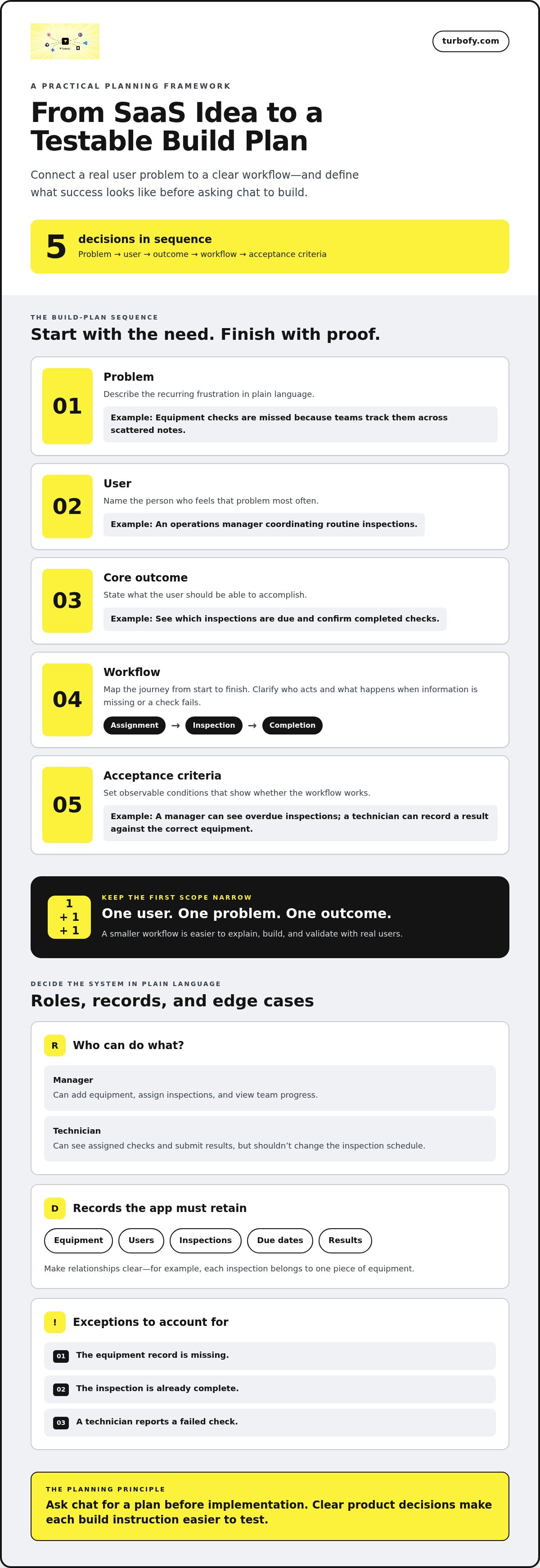
Use this five-step sequence:
-
Problem: Describe the recurring frustration in plain language. For example, equipment checks are missed because teams track them across scattered notes.
-
User: Name the person who feels that pain most often, such as an operations manager coordinating routine inspections.
-
Core outcome: State what that user should be able to accomplish, such as seeing which inspections are due and confirming completed checks.
-
Workflow: Map the actions from start to finish, including who takes each action and what happens when information is missing or a check fails.
-
Acceptance criteria: Define observable conditions for success. For example, a manager can see overdue inspections, and a technician can record a result against the correct piece of equipment.
Start with one user, one problem, and one outcome
Get specific before naming features. Ask who encounters the problem, how often it comes up, what they do now, and what a successful result would look like. Replace “teams need better operations software” with a sharper statement: “Operations managers lose track of which equipment inspections are overdue.”
Then test the assumption with a question, not a sales pitch: “Tell me about the last time an inspection was missed. How did you find out, and what happened next?” The answer helps reveal whether the pain is real and frequent enough to shape a first release around one complete workflow, rather than a wishlist.
Describe roles, data, and workflows in plain language
Spell out access in everyday terms. A manager can add equipment, assign inspections, and view team progress. A technician can see assigned checks and submit results, but shouldn’t change the inspection schedule. Next, name the records the app must retain: equipment, users, inspections, due dates, and results. Explain the relationships, such as each inspection belonging to one piece of equipment.
Map the journey from assignment to completion. Include likely exceptions: the equipment record is missing, the inspection is already complete, or a technician reports a failed check. Making these decisions early helps prevent mismatched screens, fields, and permissions later.
Keep the first scope narrow: a smaller workflow is easier to explain, build, and validate with real users. To build SaaS apps with chat, ask for a plan before implementation. Try: “Using this user, problem, outcome, roles, records, and workflow, draft a first-release plan. List assumptions and acceptance criteria. Don’t implement anything yet.” Review the plan, resolve unclear assumptions, then move forward in deliberate steps.
Once the plan is clear, a chat-driven workspace such as Turbofy’s app development workspace brings app building together with data management, authentication, and workflows as you evolve the product.
Which SaaS decisions should you settle before building through chat?
A clickable demo can prove that a screen appears. It can’t prove that users can complete a valuable task, that records are handled as intended, or that access matches how a team works. Before you build SaaS apps with chat, decide what the first release must do, who can do it, and which complexity can wait.
Favor a narrow first release when it lets you test the core value with less effort. For each proposed feature, ask: does it help the target user reach the main outcome, or can you learn just as much without it? A polished dashboard, several integrations, and extensive customisation may look impressive, but they can add build and validation work before you know whether the basic workflow is useful.
Choose the simplest data and permission model that fits
Shape records around real business concepts, not just whatever fields are easiest to generate. If the app tracks service requests, a request might belong to a customer and have an assigned owner. Those relationships should reflect how people refer to and manage the work. Keep the model lean, but don’t flatten concepts that users need to distinguish.
A single-user tool may only need each person to see their own records. A team product brings different decisions: are records shared across the organisation, assigned to individuals, or restricted to specific groups? Start with roles that match actual responsibilities, such as “manager” and “member.” Add exceptions only when a real workflow requires them. Every special permission creates another rule to explain and test.
Be deliberate with personal or sensitive information. Decide whether the product truly needs each field, who should access it, and how it will be handled before asking chat to add it. Business rules around visibility and access deserve careful human review. A generated permission setting is not proof that the policy fits your users.
Decide what belongs in version one
Sort requests by their effect on the core outcome. Keep capabilities required to complete the main task in the first release. Defer enhancements that improve convenience but don’t unblock it, such as extra reports or advanced customisation. Treat integrations the same way: include one when the first workflow depends on it, not simply because it might be useful someday.
-
Core: Needed for a user to complete the product’s central task.
-
Later: Helpful, but the first version can deliver value without it.
-
Unproven: Based on an assumption that needs testing before it becomes a requirement.
Record assumptions in plain language instead of letting chat silently fill gaps. For example: “A team member can view all requests but can edit only requests assigned to them.” Then ask the assistant to flag unclear rules before implementation. This makes decisions visible and easier to revise.
The goal isn’t to ship the smallest demo. It’s to release the simplest coherent product that can test a real user outcome. That boundary keeps the build focused while leaving room to expand when feedback shows what users need next.
How to test and improve a SaaS app built through chat
A generated screen can look finished while the workflow behind it still breaks. Test the product as a user would: start with a real task, follow it through, and check whether the result matches your expectation. This gives you evidence to guide the next chat request instead of relying on appearances.
Validate the workflow before polishing the interface
Start with a first-time user who doesn’t know the app’s hidden rules. Can they begin the core task and understand what to do next without your explanation? Watch for missing instructions, unclear labels, and steps that depend on information the user hasn’t entered.
Test a full journey using realistic records. For an appointment scheduling app, create a customer, choose an available time, and confirm the booking. Then try an empty schedule, a missing required detail, a duplicate booking, and a change to the appointment. Check permission boundaries too: can a user view or edit only the records their role allows?
Use this repeatable loop:
-
State the expected behavior. “A customer can book an available time and see a confirmation.”
-
Try the journey. Follow the steps using realistic information and the relevant user role.
-
Record what happened. Note the expected result, actual result, and where the experience diverged.
-
Request one change. Name the affected workflow and the specific outcome you want.
Ask testers whether they completed the task and where they hesitated. Visual preferences can matter later, but first find out whether the workflow is understandable and useful.
Use chat to iterate without losing track of changes
Keep each request narrow. For example: “In the appointment booking flow, prevent customers from selecting a time that is already booked. Keep the customer form and staff calendar unchanged.” Naming both the change and what should stay as-is helps limit unintended effects. After the update, repeat the original test and check related screens.
Be especially careful when a change affects shared data or permissions. A field used in several views might alter how records appear elsewhere; a role rule might block an action another workflow depends on. Retest connected paths, not just the screen where you noticed the issue.
Keep a short decision log with accepted rules, open questions, and test results. For each change, note what you asked for and whether the expected behavior passed. That record reduces repeated debate and helps you build SaaS apps with chat through deliberate iterations rather than a trail of disconnected edits.
Put this loop into practice in Turbofy’s chat-driven app development workspace, where you can build and evolve business applications while working with data management, authentication, and workflows.
How Turbofy supports building and evolving SaaS apps through chat
A clear build plan gives chat something useful to work from. Turbofy brings that conversation into an app development workspace where you can shape a business application, refine it, and work with the components that support its core workflows. You still make the product decisions: which users the app serves, what information it needs, and what a successful task looks like.
Bring app building and core business functionality into one workspace
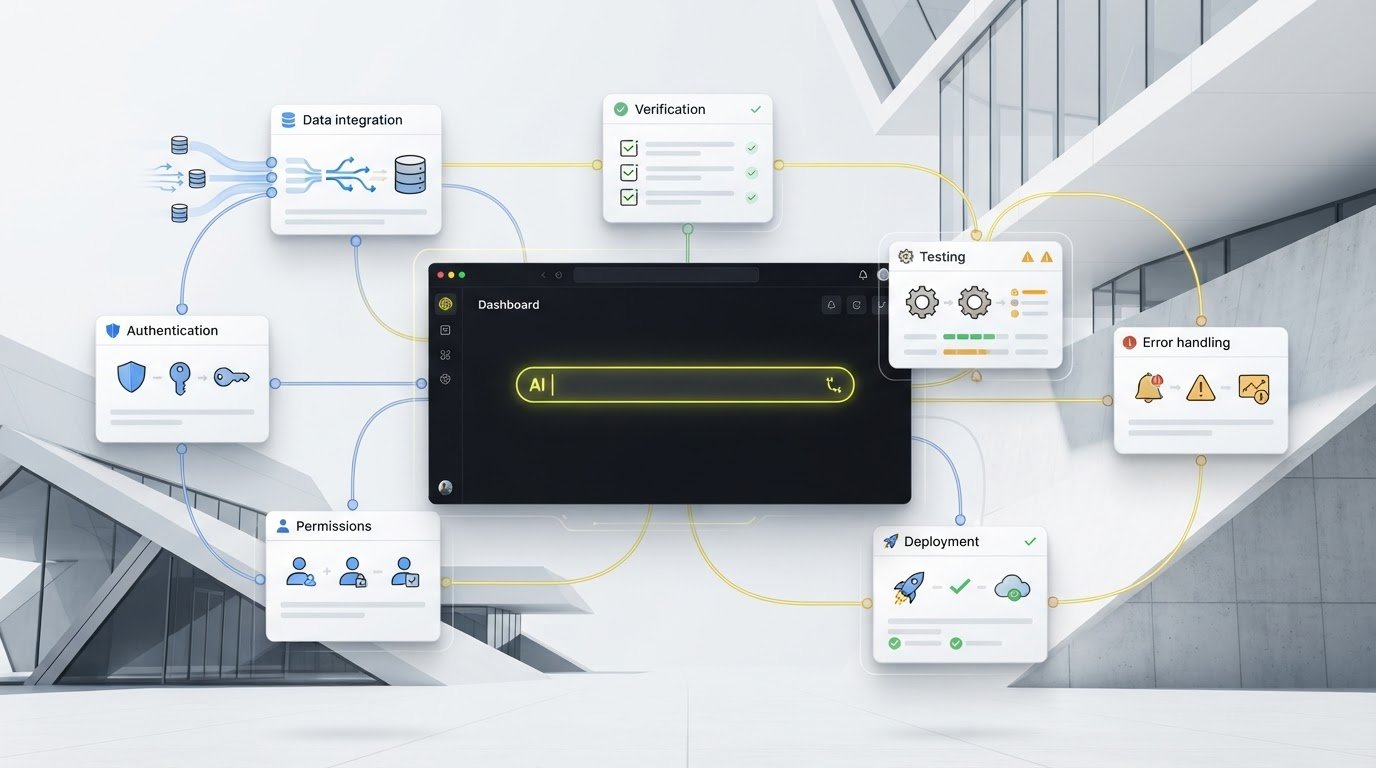
Building an app involves more than generating an interface. The records behind a screen, the way users sign in, and the rules that move work from one step to the next all affect whether the product holds together. Turbofy combines app development with data management, authentication, and workflows, giving you a connected place to work through those decisions as the application evolves.
That integration maps to practical product questions. If your app stores service requests, decide what belongs in each record and how records relate to customers or team members. If different users have different responsibilities, define what each should be able to access as you plan authentication and permissions. If a request moves from “new” to “assigned” to “complete,” describe that workflow and check that the app reflects it as intended.
Use chat to make a specific change, then review what happened. You might clarify a workflow step, adjust how a record is presented, or refine who can carry out an action. Turbofy supports rapid development and iteration, but generated behavior still needs your judgment and testing. The conversation is a way to direct decisions, not a guarantee that every result fits your product on the first try.
The workspace also includes managed app hosting and integrates with Claude, ChatGPT, GitHub Copilot, and Gemini. These capabilities sit alongside app building rather than replacing the work of defining requirements, checking behavior, and learning from users. Hosting and integrations support the workspace, but they don’t establish that an application is ready for every use case.
Move from learning the workflow to trying it
A chat-driven workspace can be useful when you have a focused idea, a defined first workflow, and a willingness to test and refine what you build. Start with one user journey. Ask for a small, understandable change, inspect how it affects the app, and use feedback to decide what comes next. That approach keeps iteration tied to user value instead of turning into a stream of unreviewed features.
If you’re ready to build SaaS apps with chat, take your scoped idea and acceptance criteria into Turbofy’s app development workspace. The Free Tier gives you a way to start exploring the workflow. Keep validating the application with realistic tasks and user feedback as it develops.
Make your next product decision the starting point
Your first version doesn’t need to settle every question about your business. It needs to help you learn something real: whether a specific user can complete a task and whether that outcome deserves another iteration. Treat each release as a chance to replace assumptions with evidence, then let that evidence guide what you build next.
That mindset makes it practical to build SaaS apps with chat without handing product judgment to the tool. Keep a short list of what you still need to learn, choose the most useful next test, and turn its result into a clear instruction. Progress comes from decisions you can inspect and improve, not from generating more screens. Let user feedback shape the product’s direction, even when it challenges your original idea.
Ready to put the approach into motion? Start with one real problem and a testable workflow. Explore Turbofy and shape your first app workflow.
Frequently Asked Questions
Can you build a SaaS app with chat without knowing how to code?
Yes, you can use chat to create and revise an app without writing code yourself, but you still need to make product decisions and review the results. Be ready to explain what users should do, what information the app needs, and what should happen in unusual cases. For example, decide whether a cancelled booking can be restored. If you can describe and test the rule, you can direct the build more effectively.
What should I include in a prompt to build a SaaS app?
Include the intended user, the problem they face, the outcome they need, and the action you want the app to support. Add relevant records, role boundaries, and examples of expected behavior. For a booking tool, specify who can create a booking, which details are required, and what should happen if a time is unavailable. Ask the assistant to identify unclear assumptions before it makes structural changes.
Can chat build a SaaS app from one prompt?
One prompt can start a draft, but it rarely captures every decision needed for a reliable product. A request to “make a booking app” leaves open questions about availability, cancellations, user access, and duplicate appointments. Use the first response to expose those gaps, then clarify them in focused follow-up requests. If you want to build SaaS apps with chat, treat the conversation as an iterative process, not a one-shot instruction.
How do I know if a chat-built SaaS app is ready for users?
It’s ready for a limited user test when someone unfamiliar with your plan can complete the intended task, understand the result, and recover from common mistakes. Check that important actions produce the expected saved information and that users can’t accidentally access actions outside their role. Start with a small, controlled group, explain that you’re testing the product, and provide a way to report confusing steps or unexpected behavior.
Is a chat-built SaaS app the same as a no-code app?
Not necessarily. No-code describes an approach that lets people configure software visually or through other tools without hand-writing code. Chat-led building describes how you communicate requirements and request changes. A chat-based workspace may handle app structure through conversation, while the underlying implementation can differ. Compare tools by what they let you build, inspect, test, and change, rather than assuming every chat builder uses the same no-code method.
What is the difference between a SaaS prototype and a SaaS product?
A prototype helps explore an idea; a product supports users completing the task consistently. For instance, a prototype might show a polished invoice screen, while a usable invoicing product needs to handle saved customer details, edits, and the status of each invoice. The practical test is whether the system supports repeat use and predictable outcomes, not whether a demo looks convincing during a presentation.
Can I keep improving my SaaS app after building its first version through chat?
Yes. A first version can be refined as user feedback reveals missing steps or new needs. Make changes deliberately: describe the problem, request one update, and check the parts of the app that depend on it. For example, adding a new customer category may affect filters, reports, and existing records. Keep a record of changes and test against real tasks so improvements don’t quietly break established behavior.