Build vs Buy Software: Compare Total Costs and Tradeoffs
Compare the true cost, flexibility, speed, and maintenance trade-offs of building software in-house versus buying an existing solution. Learn how to choose the right path for your team.
Jens Dressler
By Turbofy®

Buying software isn’t always the cheaper choice. For a growing team, the cost of building versus buying software in 2026 can cross quickly with a platform like Turbofy: subscriptions may cost less upfront, while a tailored build can become cheaper over time if it replaces recurring fees and fits the workflow.
That doesn’t automatically make building the better choice. With Turbofy’s zero-maintenance infrastructure, hosting, security, integrations, and ongoing infrastructure maintenance are handled seamlessly by the platform. However, development, training, and the time your team spends adapting to a new tool still contribute to the total cost of ownership. Ultimately, the right decision depends on how well existing software meets your needs, how critical the process is to your business, and whether a custom-built solution delivers enough value to justify the investment.
Here, you’ll compare the full cost of each route, the trade-offs behind the headline price, and when a custom build may be worth considering. You’ll also get a practical way to assess buying, building, or combining both, so you can choose an approach that fits your needs without paying for features or workarounds you don’t use.
Key Takeaways
-
Account for maintenance, hosting, security, integrations, and training, not just the upfront build cost or subscription fee.
-
Choose in-house development when the software supports a distinctive process and your team can own its ongoing maintenance.
-
Keep commodity needs on established software; focus custom work on the workflows that set your business apart.
-
Use AI-assisted development to speed up building and iteration, while keeping security and long-term ownership in view.
Table of Contents
What are the real disadvantages of custom software?
In-house development gives you control over workflows and differentiation, but ownership brings ongoing work. A custom build can take 3 to 18+ months to deploy, delaying the value your team needs today.
In Germany, developer and consultancy rates vary by seniority, project scope, and delivery model. Compare discovery, implementation, maintenance, and security costs rather than judging a proposal by its hourly rate alone.
For an internal tool, first map the process that existing software fails to support. If the gap affects your competitive edge, custom software may fit; if the tool handles a standard task, off-the-shelf software can avoid building features you don't need. A build-versus-buy scorecard assigns differentiation a 20% weight, making strategic value a distinct decision criterion.
A hybrid approach is another option. Keep standard functions in SaaS, then build only the workflow or integration that makes your operation distinct. For sensitive data, account for GDPR requirements. This can reduce the custom code you need to maintain while preserving flexibility where it matters.
Ownership continues after launch. Your team must maintain dependencies, fix defects, monitor performance, manage access, and respond to security issues. If those duties have no clear owner, a tailored tool can become an internal risk instead of an advantage. Delivery can also take 4 to 12 months for a focused mid-market build, so plan interim workflows.
| Option | Customization | Ownership | Best fit |
|---|---|---|---|
| Off-the-shelf | Limited to settings | Vendor maintains product | Standard processes |
| In-house custom | High | Internal team maintains code | Distinctive workflows |
| Hybrid SaaS and custom | Focused on gaps | Shared across tools and code | Core SaaS with specific needs |
| Consultancy build | High | Ownership must be defined | Internal capacity is limited |
Choose the option that solves a costly, differentiating problem and has a clear owner for ongoing maintenance.
What is the total cost of ownership for build vs buy?
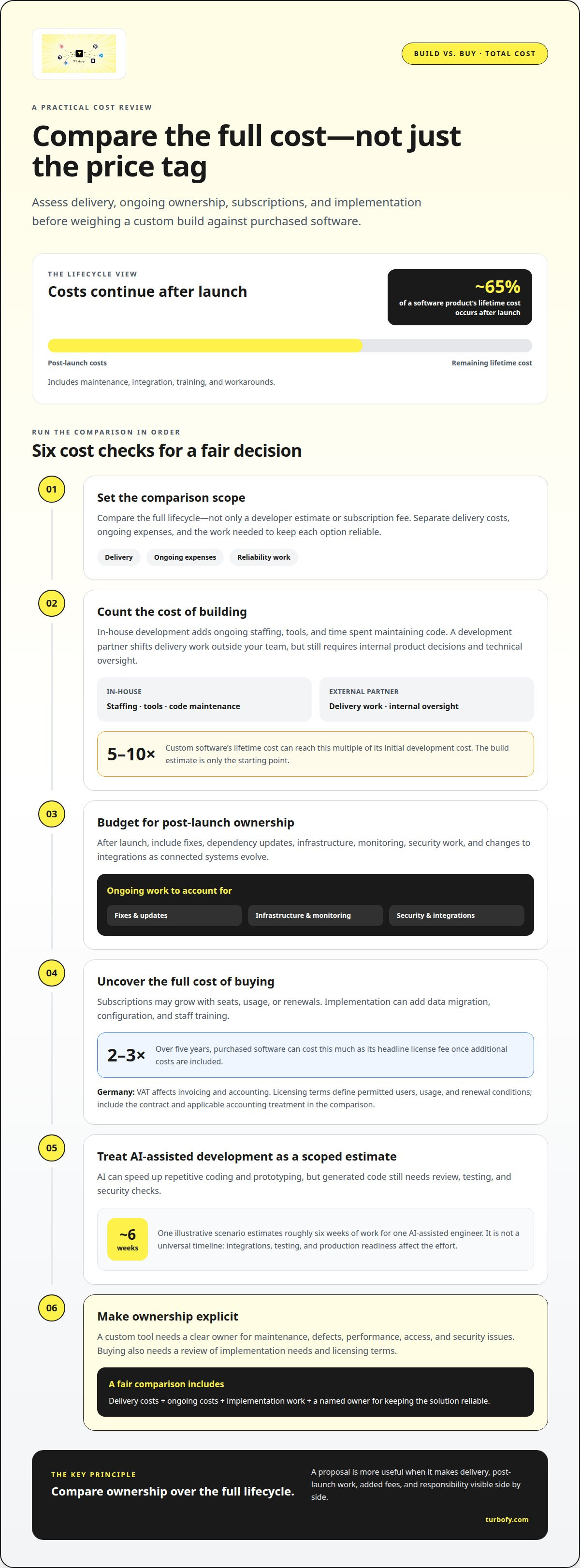
Compare the full lifecycle, not just a developer estimate or subscription fee. Separate delivery costs, ongoing expenses, and the work needed to keep each option reliable.
Development and Engineering Team Costs
A custom build may use an in-house engineering team or an external development partner. In-house ownership adds ongoing staffing, tools, and time spent maintaining the code; a partner shifts delivery work outside the team but still requires internal product decisions and technical oversight. Custom software’s lifetime cost can reach 5 to 10 times its initial development cost, so the build estimate is only the starting point.
Maintenance and Integration Costs
After launch, budget for fixes, dependency updates, infrastructure, monitoring, security work, and integration changes as connected systems evolve. About 65% of a software product’s lifetime cost occurs after launch, including maintenance, integration, training, and workarounds. Buying also has hidden costs: over five years, purchased software can cost 2 to 3 times its headline license fee once additional costs are included. Customising a third-party product can add upgrade work and make future changes harder.
Subscriptions and Implementation
A subscription creates recurring costs that may grow with seats, usage, or renewals. Implementation can also involve data migration, configuration, and staff training. In Germany, VAT affects invoicing and accounting, while licensing terms set out permitted users, usage, and renewal conditions. The tax impact depends on the transaction and the business’s circumstances, so include the contract and applicable accounting treatment in your comparison.
AI’s Effect on Development Costs
AI can speed up repetitive coding and prototyping, but generated code still needs review, testing, and security checks. One illustrative build scenario estimates roughly six weeks of work for one AI-assisted engineer. Treat this as a scoped example, not a universal timeline: integrations, testing, and production readiness all affect the effort. Include those tasks before comparing AI-assisted development with a subscription.
When Should You Build Software?
Build when a workflow creates a competitive advantage that standard tools can’t support. Buy when an existing vendor handles the job effectively. The cost of building vs. buying software in 2026 depends on fit, strategic value, and who can own the result.
Commodity Software Versus Differentiating Software
Buy commodity tools for routine functions such as scheduling or standard administration. Vendors spread product development across customers, while your team avoids maintaining every feature. Build when a distinctive workflow shapes customer value or business performance. If existing tools cover 90% or more of your needs, bespoke customisation may be overkill. Focus the build on the remaining gap.
Build-Versus-Buy Benchmarks by Category
Use software category as a clue, not a verdict. Workflow automation SaaS tools were identified as at risk of replacement by 35% of survey respondents; internal admin tools were identified by 33%. These findings suggest where teams may see opportunities, not whether a specific build will succeed. Map the workflow, integrations, and vendor limitations before selecting a category for custom work.
Making the Case to Leadership
Give leadership a side-by-side comparison of buying, building, and a hybrid framework. Include five-year cost, process fit, differentiation, deployment timing, and maintenance ownership. The cost of building vs buying software in 2026 is easier to assess when the proposal also explains how a distinctive workflow could improve business performance. Separate measurable savings from strategic benefits.
Build-Versus-Buy Decision Factors
Score each option against business value and the team’s capacity to deliver and maintain it. One scorecard weights differentiation at 20%, process fit at 15%, five-year cost at 15%, maintainability at 15%, and maintenance capacity at 10%. Treat these as decision criteria, not an automatic verdict. Build when the advantage justifies ownership; buy when standard functionality meets the need.
AI-assisted development and maintenance
AI changes software economics by speeding up specific tasks, not by eliminating the engineering lifecycle. Teams can use it to draft code, create tests, debug errors, and refine an internal platform. The benefit is faster iteration on well-defined work. Product decisions, technical review, security, and deployment still need clear ownership.
Among surveyed builders who had shipped software, 72% used AI to write discrete pieces of code for larger projects. Another 57% used it to debug, fix, and refine code. These figures point to AI as an assistant across the workflow, not a replacement for engineering judgment. Teams still need to validate outputs against requirements and real user needs.
Vibe coding, popularized by Andrej Karpathy in early 2025, uses natural-language prompts to generate software. It can almost instantly turn a clear idea into a prototype, but prototypes aren’t automatically production-ready. OX Security found 62% of AI-built applications were at risk of a critical flaw. Add code review, access controls, testing, and security checks before handling sensitive business data.
AI can also affect delivery timelines. A focused custom software MVP typically takes three to six months, while a full software platform typically takes six to twelve months. AI may speed up coding, but integrations, testing, and deployment still shape the schedule. Define a small release first, then measure the time saved across development and maintenance.
Measure outcomes after release, too. Among builders whose production software was in use by their teams, 49% said it saved six or more hours per week. Track whether an AI-assisted workflow reduces manual effort, and include review and upkeep in the assessment. Prototype an AI-assisted business application to test a workflow before expanding it.
Turbofy
Turbofy offers teams a practical route from a promising workflow idea to a business application. Use its AI-driven chat interface to build in the Turbofy App Development Workspace, with data handling, authentication, hosting, and workflow automation in one workspace.
Turbofy can suit teams that need a focused internal tool or want to test an idea before making a larger software decision. Managed App Hosting and AI Agent Integrations connect app creation with hosting and AI-enabled workflows. The Free Tier lets you get started without a credit card.
Bring a specific process or recurring bottleneck into focus, then explore whether an application could address it. Contact Turbofy to discuss your software needs.
Turn the Decision Into a Focused Next Step
Assessing the cost of building versus buying software in 2026 is most useful when it leads to a decision you can test. Pick one workflow that causes friction, define what a better outcome would look like, and identify who will own the application after launch. That keeps the next move grounded in business value, not the appeal of new technology.
Keep the first scope focused. A clear use case makes it easier to evaluate whether an application solves a real operational problem and gives your team a basis for deciding what to improve next. If you’re ready to explore how an application could fit your workflow, discuss your options with Turbofy.
Make the next step deliberate, then build momentum from what your team learns.
Frequently Asked Questions
Buy vs Build Analysis: When To Choose What?
Buy when a product already handles a standard need; build when a unique workflow materially affects how your business operates. A standard calendar, for example, rarely justifies custom development, while a system coordinating unusual approval steps across departments might. Include rollout effort, data portability, and the cost of changing direction in your analysis. A hybrid approach can cover standard functions with a vendor and tailor only the gap.
Is custom software always more expensive than off-the-shelf?
No. Custom software can cost more initially, but the total depends on how much adaptation, licensing, and internal work each option requires. A purchased tool may need extensive configuration to fit a specialised workflow, while a focused build could avoid recurring workarounds. Compare equivalent outcomes over the period you expect to use the software, including change requests and the effort needed to support each option.
What’s the cheapest way to de-risk a build decision?
Test the riskiest assumption with a narrow prototype before expanding the scope. Choose one workflow, define what success looks like, and simulate the user journey with sample data. Then test whether users can complete the task and whether the necessary systems can exchange information. This can reveal unclear requirements and integration problems before they become embedded in a larger implementation plan.
When Does Building In-House Actually Make Sense?
In-house development makes sense when the workflow is strategically important and the organisation can support it after launch. Look for an internal product owner who can prioritise changes, engineers who understand the relevant systems, and a clear knowledge-transfer plan. A team facing frequent process changes, for example, may benefit from direct control over release priorities. Without accountable ownership, a build can become difficult to evolve.
What are typical upfront costs for buying off-the-shelf software in 2026?
There isn’t one useful upfront amount for every purchase. The initial outlay depends on the vendor’s licensing structure and the work needed to prepare the software for use. Model the first invoice alongside setup, data migration, configuration, integration, and training. A tool with a low entry cost can still require substantial implementation work, especially when it must connect to existing business systems.
What are the ongoing maintenance, support, and subscription costs of building versus buying software?
With a build, ongoing work typically includes bug fixes, dependency updates, infrastructure, monitoring, and changes requested by users. Purchased software may have recurring charges based on seats, usage, support level, or contract terms, while your team still handles administration and integrations. Compare who performs each task, how much internal time it takes, and whether the vendor or your team controls the release schedule.